Part of Content release process
Deployment based processes
Different deployment decisions will impact the release and publication process, particularly the gates and level of control. These are based on if:
- a single read or write endpoint is being used for content authoring and use, or if separate endpoints are being used for content development and content publication
- a syndication server is being used to take release candidate "snapshots" which are deployed separately
- a staging publication endpoint is being used to test out releases prior to publication on a production endpoint
You may find it useful to also read about deployment models when planning a deployment, and interpreting the procedures described in this section.
The following sections define release processes for a series of common deployment patterns.
1. Single read/write server deployment
This is the simplest option, where content is authored and used from the same single read/write terminology server endpoint.
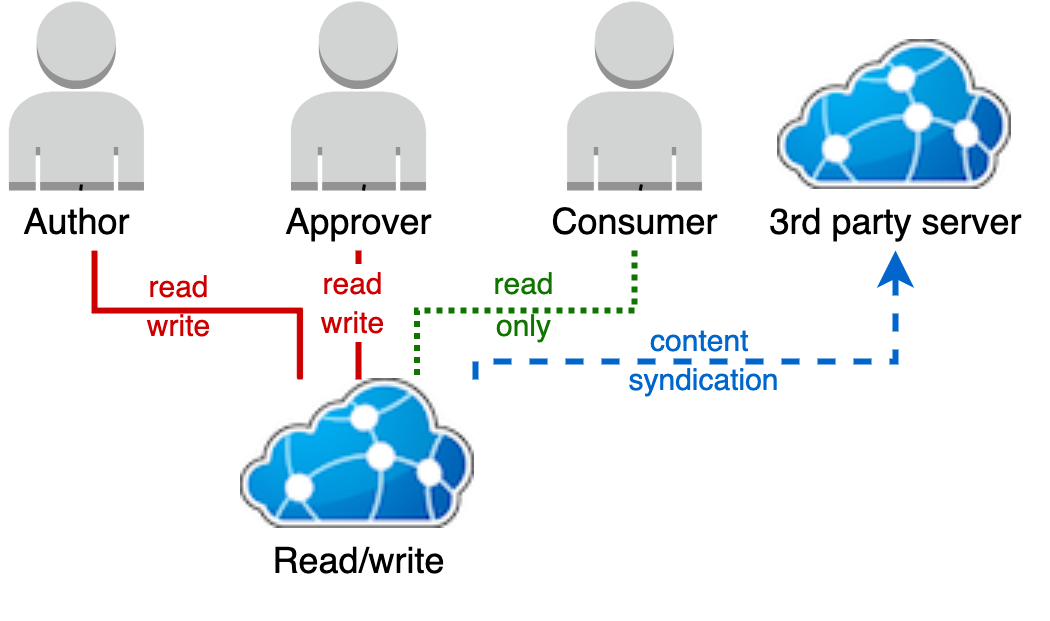
Without a separate read-only instance of Ontoserver to separate the authoring and use of content, there is no release process. Content is instead authored in the Ontoserver, and through the security model and syndication status so the availability of the content to groups of users can be controlled.
[this has been rewritten can it be checked. We also need an explanation of what the image is showing here].
Controlling read access via the FHIR API
As there is a single server, control of the approved or published state of the content visible to users is purely based on the resource level security model.
We recommend any content under development is made to be read access so only authors can see it until it ready for others to use.
To release content either:
- a security label or labels are added to grant read access to a cohort or cohorts of users
- a security label is added to grant anonymous global read access to a resource
Security labels must not be added for read access to users before the content is approved. You must also ensure your approver knows how to add the appropriate set of security labels to publish a resource.
Controlling read access via the Syndication API
The Terminology Server can be configured to syndicate all resources it contains automatically. This removes the need for an approver to set the syndication status as specified in the approval processes section.
The security labels will still apply to syndication API access, thereby controlling read only access via both FHIR and syndication APIs with the same security labels with no further action required.
The Terminology Server can be configured not to automatically include resources in its syndication endpoint if you want an extra level of control. To do this, an approver will need to set the syndication status to true on a resource so it can appear in terminology server's syndication API for download.
Separate authoring and production servers
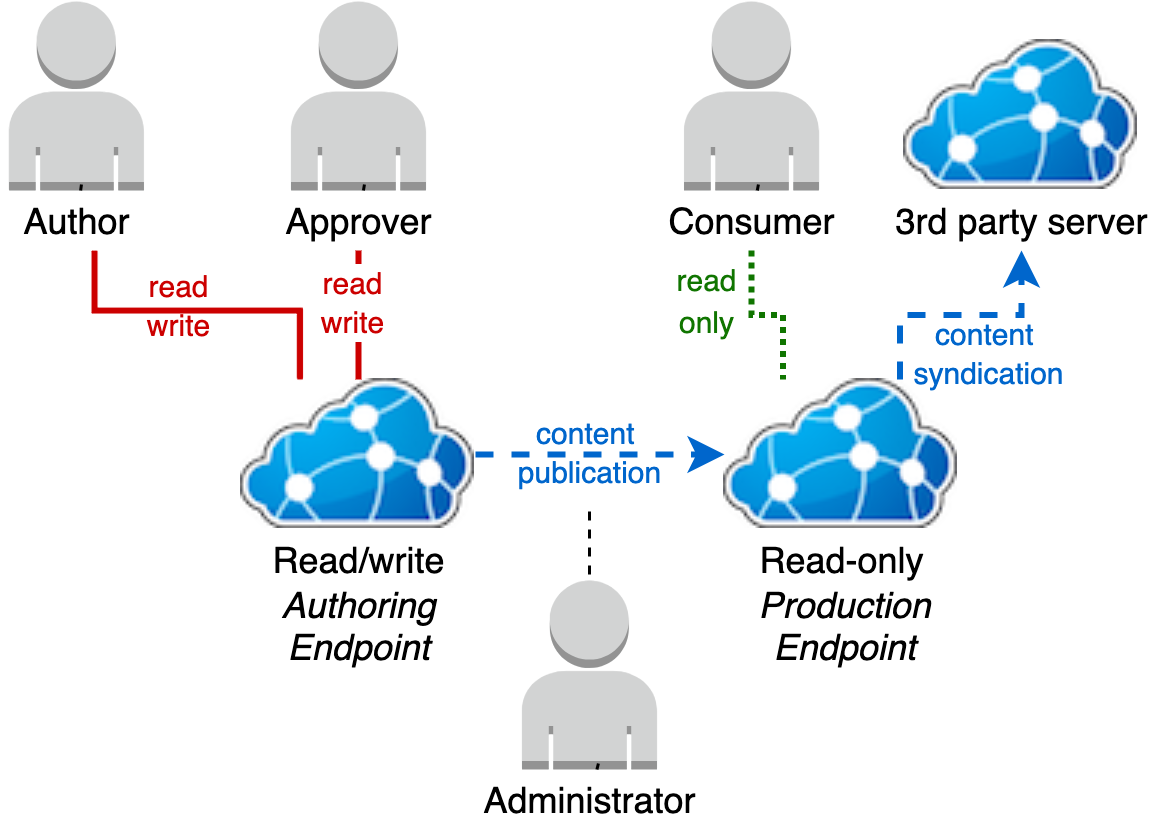
Separating out a production endpoint allows greater control over when content under development is exposed to consumers.
This model can be used to perform releases to the production endpoint when a milestone state has been achieved on the authoring server or, to operate a continuous delivery model by configuring the read only production server to pull new content from the authoring server's syndication feed on a schedule.
Approval
Content is approved by the production Terminology Server instance pulling content from the authoring server's syndication feed.
For a resource to appear in the authoring server's syndication feed requires a user with approval rights to set the syndication status of a resource to true.
A resource will not be available in the Authoring server's syndication feed and can not be imported into the Production server for downstream use until this has been done. This means draft additions and changes are kept private until they are assessed as ready for use.
Publication
The process for publishing the authoring server's system syndication feed state to the production server varies depending upon if:
- the release is additive, or needs to remove content from the existing content deployed on the production server
- persistent or transient storage is being used
Additive publication
You can use this process if you are performing a publication that is addictive (when the publication instance does not contain any resources that should be removed by the deployment).
This deployment model has a a fixed preload syndication URL configured for the production terminology server instance (the syndication feed URL of the authoring server). No reconfiguration or restart of the production Terminology Server instance is required.
This process can be used regardless of whether the production Terminology Server instance is a single instance or a scaled instance.
The process requires that the production Terminology Server instance is triggered to re-do the preload operation, which will import any resources in its configured preload feed it does not already have loaded.
For resources it does have loaded, any updated versions of resources will replace existing versions (existing versions will become historical record versions of the resource).
Manual trigger
Triggering this process manually requires an API call to the Terminology Server's syndication API.
You will need a bearer token with syndication API write access to trigger this process. We have provided a sample request assuming that AAA is the token.
curl --location --request POST 'https://ontoserver-prod-nhs.australiaeast.cloudapp.azure.com/synd/redoPreload' \
--header 'Authorization: Bearer AAA'
If you are using a read-only scaled instance using separate disk and database for each terminology server instance, you must send this request to each terminology server instance serving the endpoint.
If this request is passed through a load balancer to only one terminology server instance of many supporting the endpoint, only that terminology server instance's content will be updated.
The other instances will remain out of date, and requests to the endpoint will be inconsistent depending upon the instance they are routed to.
Automated trigger
The preload process can be configured to occur regularly on a schedule in the terminology server. You may want to refer to the preload section in Configure the terminology server on how to achieve this. The process will perform the same operation described above, however will automatically trigger based on the defined schedule. This can be used for a continuous delivery approach regularly deploying content "approved" and in the authoring server's syndication feed automatically.
While this approach is safe with single instances of the Terminology Server and scaled instances using separate disk and database for each instance of the terminology server, care must be taken with scaled instances using shared disk and database.
A scheduled content update concurrently occurring on multiple instances using separate disk and database supporting a single endpoint is useful to keep these instances' state synchronised. However the same occurring on multiple terminology server instances sharing disk and database is likely to result in contention and errors in the instances' logs as multiple instances attempt to update the shared state concurrently.
If using a shared disk and database with multiple instances of terminology server to support a single endpoint, configuring the same scheduled trigger should not be used on all of the terminology server nodes. Alternatively, configuring this schedule on one of the terminology server instances only, or configuring all the terminology server instances at different times is possible.
Alternatively, an externally scheduled REST call (as described above) through the endpoint's load balancer can be used as it will be routed to only one of the Ontoserver instances.
Non-additive publication
If a resource is removed from the authoring server's syndication feed, there are a series of options to propagate this change to the Production read-only endpoint. The resources can be removed and the new content loaded by either:
- manually by deleting the resources with administrative access and performing the redo preload process described above
- restarting the production server with a blank disk and database, which will reload the server's state from the configured preload feed (authoring server's syndication URL)
Manually deleting resources
This process is described in authoring FHIR training for FHIR resources and indexes respectively. The current syndication feed content and production server content need to be compared to determine which resources need to be removed.
If you are using a read-only scaled instance using separate disk and database for each terminology server instance, this request must be sent to each terminology server instance serving the endpoint.
If this request is passed through a load balancer to only one terminology server instance of many supporting the endpoint, only that terminology server instance's content will be updated.
The other instances will remain out of date, and requests to the endpoint will be inconsistent depending upon the instance they are routed to.
Clearing production storage and restarting the server
If you are using transient storage for the production terminology server instance, then simply stopping and deleting the terminology server container and its PostgreSQL container is sufficient. The transient storage with the terminology server and PostgreSQL containers will be removed when the containers are removed, and new blank storage will be created when a new terminology server and PostgreSQL container are created. Upon boot, the terminology server will populate its blank disk and database from the configured preload syndication feed, which in this case is the authoring terminology server instance.
If you are using persistent storage
- the terminology server container must be stopped
- its persistent disk content must be cleared to blank, or the persistent disk replaced with a new blank persistent disk
- the terminology server PostgreSQL database schema must be emptied - this can simply be achieved by dropping and recreating the schema
- the terminology server container is restarted, at which point it will repopulate its disk and database content from the configured preload syndication feed the authoring server's syndication feed
A zero down time deployment approach can be applied on top of this process.
Rollback
Rollback of release state under this deployment model is not trivial. The authoring server's syndication feed state must be manipulated into the desired state and the publication process followed again to correct any content publication issue requiring a rollback.
Comprehensive deployment
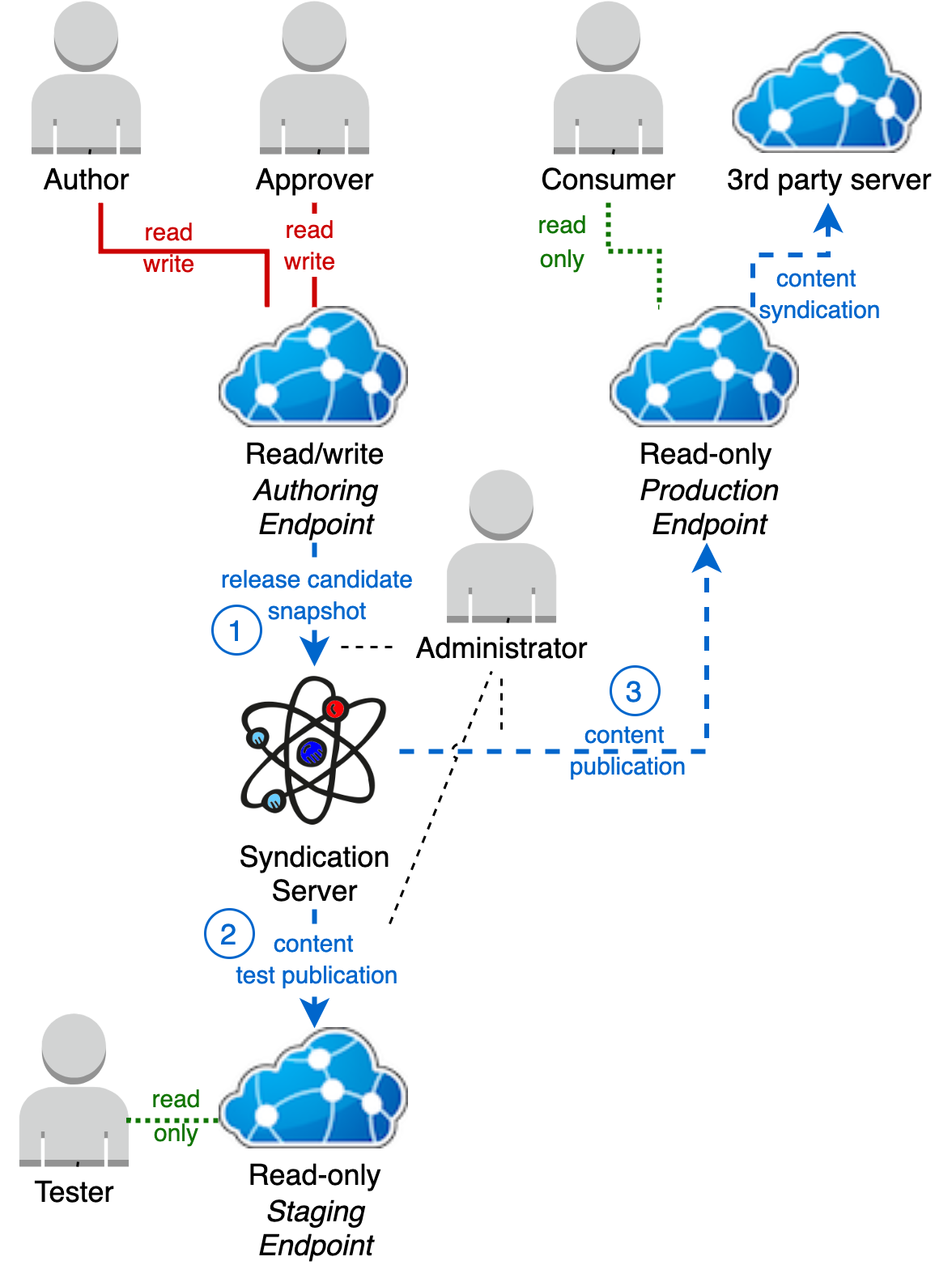
The most comprehensive solution is to use both a staging server and a syndication server. This allow for full release history, rollbacks to any previous release point and production-like testing of release candidates prior to production publication.
Create a release candidate
Create a release candidate
The syndication server, Atomio, can clone a syndication feed and keep a static copy.
Timing of this snapshot must be coordinated with all the affected content owners/approvers for the Authoring server to ensure they are not part way through setting syndication status on resources . So their current syndicated resources on the authoring server represent a stable state.
Prerequisites
The following prerequisites are required:
- The syndication server must have network connectivity to the authoring server's syndication endpoint.
- The syndication server must have a configured set of client credentials enabling it to read the Authoring server's syndication endpoint, refer to configure the syndication server to create release candidates’ in Appendix G. If FHIR security labels are in use on the authoring server, it is necessary to grant these credentials read access to all security labels in use on resources that should be included in the snapshot.
- A set of client credentials with write access to the syndication server.
Procedure
This process is intended for Administrators, and can be automated. Presently there is no user interface for this feature, therefore if performed manually a tool such as Postman could be used. We have described the necessary requests using cURL, which can be imported into Postman.
Get a bearer token
The following cURL command gets a bearer token from the authorisation server.
cURL command to get a bearer token
url --location --request POST 'https://authorisation-server/auth/realms/realm-name/protocol/openid-connect/token' \
--header 'Content-Type: application/x-www-form-urlencoded' \
--data-urlencode 'grant_type=client_credentials' \
--data-urlencode 'client_id=XXX' \
--data-urlencode 'client_secret=YYY'
| Placeholder | Required value |
|---|---|
| authorisation-server | host name of the authorisation sever for the solution |
| realm-name | realm id for the solution |
| XXXX | host name of the authoring terminology server to clone the feed from |
| YYY | the bearer token taken from the earlier step |
Where the above placeholders require completion for the specific installation, the response will include a JSON payload similar to the following:
Token response
{
"access_token": "AAA",
"expires_in": 3600,
"refresh_expires_in": 1800,
"refresh_token": "BBB",
"token_type": "bearer",
"not-before-policy": 1601356578,
"session_state": "12bd48fc-5373-410b-a016-f208fc827095",
"scope": ""
}
Where AAA will be a long string of characters. This is the bearer token required in the next step.
Clone the authoring server feed
The syndication server exposes a REST API call used to clone a syndication feed. This can be used to create a snapshot of the authoring server's syndication feed representing the approved content state in the server.
Inputs to this request are:
- the URL of the syndication feed to clone
- the name to use to identify the new clone on the syndication server
The URL of the syndication feed to clone is the URL of the authoring server's syndication feed. The name used to identify the new cloned feed on the syndication server can be any name unique (not yet used) on the server. It is, however, useful to establish a convention which will help easily identify the release candidate feeds. A naming convention of release-candidate-YYYYMMDDThhmm is recommended, so for example releasecandidate20200815T1300 to indicate a release candidate taken at 1pm on the 15 August 2020. We have provided an example of the REST call required to create a release candidate snapshot
Release candidate creation REST required
curl --location --request POST 'https://syndication-server/feed/$clone?name=release-candidate-20200815T1300&url=https://authoring-server/synd/syndication.xml' \
--header 'Authorization: Bearer AAA
where the following placeholders require completion for the specific installation.
| Placeholder | Required value |
|---|---|
| syndication-server | host name of the syndication server |
| authoring-server | host name of the authoring terminology server to clone the feed from |
| AAA | the bearer token taken from the earlier step |
Release candidate creation response
{
"name": "release-candidate-20200815T1300",
"url": "https://syndication-server/feed/release-candidate-20200815T1300/syndication.xml"
}
List release candidates
It is possible to view a list of available feeds on the syndication server, which will list all available release candidate snapshots. This is useful when confirming configuration to deploy a release candidate to staging or production.
Prerequisites
A set of client credentials with read access to the syndication server are required.
Procedure
As there is presently no user interface for this feature - an HTTP request tool such as cURL or Postman is required. This cURL and Postman blog provides an example using cURL which can easily be imported into Postman.
REST request to list feeds
First get a bearer token. The process to do this is described above in the section describing how to create a release candidate.
CURL command to list feeds from Atomio
curl --location --request GET 'https://syndication-server/feed' \
--header 'Authorization: Bearer AAA'
Where these placeholders require completion for the specific installation.
| Placeholder | Required value |
|---|---|
| syndication-server | Host name of the syndication server |
| AAA | The bearer token taken from the earlier step |
The response will be a JSON payload containing a list of all the syndication feeds in the syndication server detailing their name, title and URL.
Example feed listing request response
[
{
"name": "test",
"title": "test",
"url": "https://syndication-server/feed/test/syndication.xml"
},
{
"name": "authoring-input",
"title": "Input indexes and FHIR content for the authoring server",
"url": "https://syndication-server/feed/authoring-input/syndication.xml"
},
{
"name": "release-candidate-20200815T1300",
"title": "Release candidate snapshot taken 20200815T1300",
"url": "https://syndication-server/feed/release-candidate-20200815T1300/syndication.xml"
}
]
Deploy a release candidate to the staging or production server
This procedure describes how to deploy a release candidate to the Staging or Production server - the process is the same as these are both read-only the terminology server instances. The process may need to vary if the staging and/or production servers are scaled instances. Further information is available in Appendix A.
Stop the server
This procedure also assumes that the Staging/Production server does not need to be always on, and can therefore have an outage to deploy the release candidate. If a zero down time deployment is required this process can be adapted to achieve that with supporting infrastructure. Please refer to Appendix C for more details.
The staging and production server the terminology server container should be shut down. The procedure to do this will vary depending upon your container hosting technology.
Reconfigure preload feed URL
A new preload URL will have been created as part of the procedure to create a release candidate described above. This URL will need to be configured into the Staging/Production server, replacing the existing configured release candidate URL from the previous deployment to the Staging/Production server. This is achieved by changing the environment variable atom.preload.feedLocation passed to the Staging/Production server's docker container. For example changing atom.preload.feedLocation=https://syndication-server/feed/release-candidate-20200815T1300/ syndication.xml to atom.preload.feedLocation=https://syndication-server/feed/release-candidate-20200820T1630/ syndication.xml to shift from a release candidate taken on August 15 to August 20.
Specifically how this configuration is supplied will depend on the technology used to configure and host the Ontoserver container for example Kubenetes, Helm, Docker Compose. Refer to the hosting details of your specific installation.
Clear database and storage
The staging or production server's state should be cleared so that it can be rebuilt from the data in the new preload feed. There are two aspects to this:
- The terminology server database
- The terminology server's filesystem storage
Depending upon whether persistent or transient storage is being used for the Staging/Production server (refer to Shared resources and persistent storage in Appendix F) and the hosting technologies being used, this process may vary.
However, broadly:
- if transient storage/database is being used simply stopping and deleting the Ontoserver container and its PostgreSQL container is sufficient
- if persistent storage/database is being used the Ontoserver container must be stopped
- its persistent disk content must be cleared to blank, or the persistent disk replaced with a new blank persistent disk
- Ontoserver's PostgreSQL database schema must be emptied, this can simply be achieved by dropping and recreating the schema
Restart server
Once the staging or production server has been reconfigured and its database and filesystem cleared, The terminology server can be started with this new configuration.
Specifically how this is achieved will depend upon the technology used to configure and host the the terminology server container.
Once started, the terminology server will immediately read and load all of the FHIR resources and indexes listed at the specified preload syndication feed URL. Any errors during this process will be reported in the terminology server logs, and once this process is completed (with or without errors from any/all items to load) a message with the text 'End of preload' will be logged by the terminology server.
Addition only releases
An optimisation of the processes described above to release content changes to Staging/Production can be applied in the case where a release candidate only contains additions to the previously loaded content. So the release candidate doesn't need to remove any currently deployed content which is now omitted from the syndication feed to be deployed.
The terminology server supports a syndication API REST request that causes the server to redo the "preload" it performs on start up. This will cause the terminology server to fetch any content it doesn't already have from its configured atom.preload.feedLocation feed URL.
This can be useful when persistent storage is being used with an the terminology server instance and can even be used to do hot updates to the content of a running the terminology server instance if the preload feed has been updated at the same URL. This process is typically quick as only the delta between the currently deployed release and the new release is downloaded and installed. However this method is limited to cases where the release being deployed is additive to the existing deployed content. Any deployed content that is not in the new release feed will not be removed from the server.
With a new preload URL for a new release candidate feed, the Staging and Production servers would need to be restarted to configure in the new atom.preload.feedLocation value, and on restart would add the new content in the preload feed to the existing content in the persistent storage.
If the existing preload URL has been updated with added content , this can be achieved by deleting and recreating a release candidate feed with the same feed name, the following syndication API method can be called.
A bearer token with syndication API write access is required to trigger this process. Below is a sample request assuming that AAA is such a token.
curl --location --request POST 'https://ontoserver-prod-nhs.australiaeast.cloudapp.azure.com/synd/redoPreload' \
--header 'Authorization: Bearer AAA'
The request will return immediately reporting '200 OK' if the process has been triggered and is running asynchronously, or an error code if it cannot be.
If using a read-only scaled instance (see Appendix A) using separate disk and database for each Ontoserver instance, this request must be sent to each Ontoserver instance serving the endpoint. If this request is passed through a load balancer to only one Ontoserver instance of many supporting the endpoint, only that Ontoserver instance's content will be updated. The other instances will remain out of date, and requests to the endpoint will be inconsistent depending upon the instance they are routed to.
Rollback
Rollback is achieved in this model by redeploying to the production server using the preload feed/s on the syndication server that represented the last known good state. The syndication server can store many feeds over time representing these release candidate states. The staging and production read-only servers can be rolled forward or backwards to these stable release points.
Last edited: 4 March 2021 1:36 pm