Passkeys (synced, not device-bound)
Information about using NHS CIS2 Authentication with passkeys, which require fewer steps to log in for compatible devices than other authenticators.
This guidance is for AAL2 passkeys, which are not bound to a device.
For secure, device-bound AAL3 passkeys on Android devices, read this guidance instead. For iOS devices, read this guidance.
What is a synced passkey?
Passkeys are a technology that allows authentication without passwords.
As an option for CIS2 authentication, passkeys enable health and care professionals to log in with fewer steps and can reduce context-switching.
A synced passkey is bound to your profile (such as Google or Microsoft) and can be used on any device linked to that profile.
- A strong authenticator that's more resistant to scamming or phishing
- Simple and convenient steps to log in
- No need to buy new technology - passkeys work on a user's smartphone and on all modern web browsers
- Provides NHS organisations with options to promote use of an authenticator across Apple and Google devices, opening options on different operating systems
How to use passkeys
Go to the national clinical information system that you wish to access. Some systems will automatically send you to the NHS CIS2 authentication page. Others may require you to select a login button.
Select 'Passkey' and then 'Continue'.
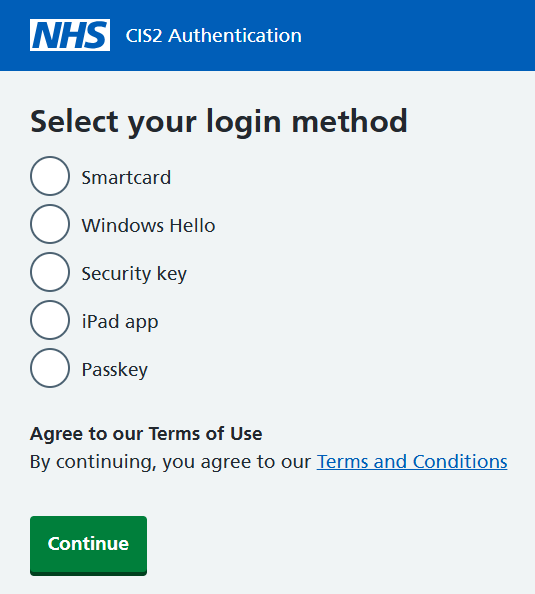
Follow the instructions on your device. The instructions you see will depend on your device. You can see below an example of the login steps on a Windows machine.

Role selection
You may be shown a screen to select the Role you want to use. This is dependant on the application you are using and the number of roles that you have assigned to you.
If you have:
- only 1 role, that role is selected for you and and won't see the Role Selection page
- 2 - 5 roles, they will be listed for you to select from. Select the role you want to use.
- more than 5 roles, they will be listed for you to select from as well as a search box to filter the list
Once you have found the appropriate role, select the role you want to use.

Troubleshooting
If the face scan does not work, you will be prompted to enter your Windows Hello PIN. If you have forgotten the PIN you will need to talk to an RA who will deregister your Windows Hello device and register your Windows Hello device again.
Check you are using a power source or have more than 20% battery on your device. If the battery drops below 20% battery saver mode will automatically start which affects the use of passkeys.
Help for IT teams
Guidance by operating system
Using passkeys with CIS2 Authentication can look different based on operating system.
With any of the operating systems below, if the device is managed by your estate, you'll need the ability to use passkeys enabled in your mobile device management. This may be as simple as allowing Windows Hello as an authentication method, or enabling iCloud Keychain to be used on Apple devices.
Windows
To use passkeys on Windows devices, you will need at minimum Windows 11.
Modern browsers such as Google Chrome and Microsoft Edge natively support passkeys.
You can also use Windows Hello as a passkey - find out more.
Apple
To use passkeys on Apple devices, you will need at minimum:
- iOS 17
- macOS Ventura
Read more about using passkeys to sign in to websites and apps on iPhone.
To use passkeys on Google devices, you will need Android version 15 (though some Android 14 devices may also work).
Procurement
Using passkeys with CIS2 Authentication only requires that the device used is compliant.
NHS organisations looking to use passkeys for all staff members should consider:
- the device mix present in their estate
- whether they have a BYOD policy
Test passkey registration
You can test passkey registration using this link.
You'll need to enter a test name into the input box. You should be able to leave the advanced settings as they are, but the following must be set:
- User Verification: required
- Discoverable Credential: required
These would be the correct settings for a test using the name Clinical_user_1.

Select 'Register' and follow the instructions on screen. You should see a success message, then you'll be asked to select 'Authenticate' to perform the test.
Support
You can get support by going to the NHS Digital Customer Portal or emailing [email protected]
Contact us
There are lots of features we are working on and considering for the future. We'd love to hear what you think.
To suggest new features or improvements, contact us by emailing [email protected]
To give us feedback on your experience with passkeys, please take our short survey.
Last edited: 5 October 2026 9:44 am