Part of PLICS guide 2022 Integrated trust specific summary reports
Trust summary report overview
The main audience for this guidance document is the submitters of data for the PLICS Integrated collection for financial year 2021/22 data.
This collection covers financial year 2021/22 data for which Patient Level Costing data is being collected for acute, mental health, IAPT and community health services from all designated providers.
For the PLICS Integrated collection, providers will be able to access up to five types of summary reports from NHS Digital depending on the data submitted.
Report details
Providers will only see their own data in the relevant report(s) which is compiled based on PLICS data submitted to NHS Digital.
The file format of the report(s) is Comma Separated Values (CSV) file format.
The five reports are:
PLICS_Acute_OS_Summary_Report
PLICS_MHCC_Summary_Report
PLICS_MHPS_Summary_Report
PLICS_IAPT_Summary_Report
PLICS_CSCC_Summary_Report
The filenames of the five reports are defined (as per the order above) as:
PLICS_Acute_OS_Summary_Report_XXX_YYYYMMDDTHHMMSS
PLICS_MHCC_Summary_Report_XXX_YYYYMMDDTHHMMSS
PLICS_MHPS_Summary_Report_XXX_YYYYMMDDTHHMMSS
PLICS_IAPT_Summary_Report_XXX_YYYYMMDDTHHMMSS
PLICS_CSCC_Summary_Report_XXX_YYYYMMDDTHHMMSS
The ‘XXX’ denotes the ODS code of the trust submitting the data.
The date/time stamp is included in the form of YYYYMMDDTHHMMSS to indicate when the report was generated.
The table below outlines with a ‘Y’ to denote YES, which PLICS feed types will be reported in the relevant report(s) based on data submitted.
| Feed type | PLICS_Acute_OS_Summary_Report | PLICS_MHCC_Summary_Report | PLICS_MHPS_Summary_Report | PLICS_IAPT_Summary_Report | PLICS_CSCC_Summary_Report |
|---|---|---|---|---|---|
| APC | Y | ||||
| OP | Y | ||||
| EC | Y | ||||
| SWC | Y | ||||
| SI* | Y | ||||
| MHCC | Y | ||||
| MHPS | Y | ||||
| IAPT | Y | ||||
| CSCC | Y |
*Data relating to the SI feed type is included in the PLICS_Acute_OS_Summary_Report. As such, the ‘OS’ in the report name denotes that other services may be included.
Reporting criteria
The report(s) will contain the latest data submitted by each trust on the basis that this will include data which has passed validation at NHS Digital and has been loaded to NHS Digital systems for processing.
Reporting frequency
The report(s) will be generated on a daily basis during the PLICS Integrated collection submission window for any trust which has submitted or resubmitted PLICS data to NHS Digital, which has passed the relevant schema validation (see 'Reporting levels' for details of the feed types to which the reports relate).
The report(s) will normally be accessible the next working day after PLICS data has been submitted to NHS Digital (following the process of loading data to NHS Digital systems has completed). NHS Digital will process data for up to a maximum of 30 trusts in a batch per night, to aim to provide summary reports consistently the next working day for providers, allowing time to process the volumes of data involved.
Any data submitted to NHS Digital after 6pm on the previous working day will not be included in the report(s).
The report(s) are date/time stamped to indicate when these were generated.
PLICS data submitted and loaded up to the date/time recorded in the filename will be included in the report.
Any data submitted or loaded after the date/time specified in the filename will be made available in subsequent reports.
Where trusts have resubmitted their data to NHS Digital, a further report(s) will be produced, and trusts should ensure they select the latest report (by carefully selecting the latest date/time stamp from the filename) to get the most up to date view of the data submitted and loaded.
In the event your report is not available by 12pm and you submitted PLICS data to NHS Digital before 6pm the previous working day, you may wish to raise a service call with the NHS Digital National Service Desk via email to: [email protected].
Reporting levels
PLICS_Acute_OS_Summary_Report
This report is produced if data for any of the Feed Types of (APC, EC, OP, SWC, SI) have been submitted.
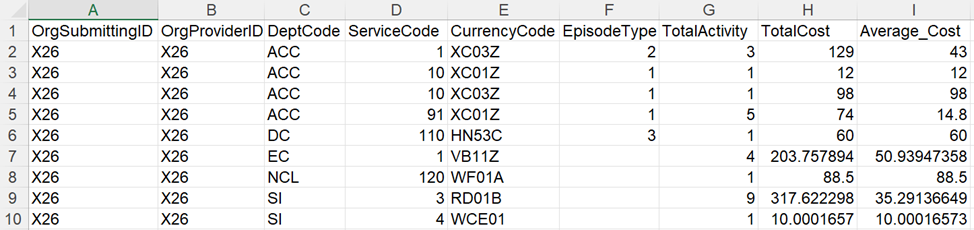
The report is broken down at trust level, ‘Department Code’ (DeptCode), ‘ServiceCode’, ‘CurrencyCode’ and ‘EpisodeType’ (where relevant). The column order of the report is as shown in the screenshot provided below.
PLICS_MHCC_Summary_Report
This report is produced if data for the feed type of MHCC has been submitted.
The report is broken down at trust level, ‘Feed Type’, ‘PatCAS, and ‘Cluster’ (where relevant). The column order of the report is as shown in the screenshot provided below.

PLICS_MHPS_Summary_Report
This report is produced if data for the feed type of MHPS has been submitted.
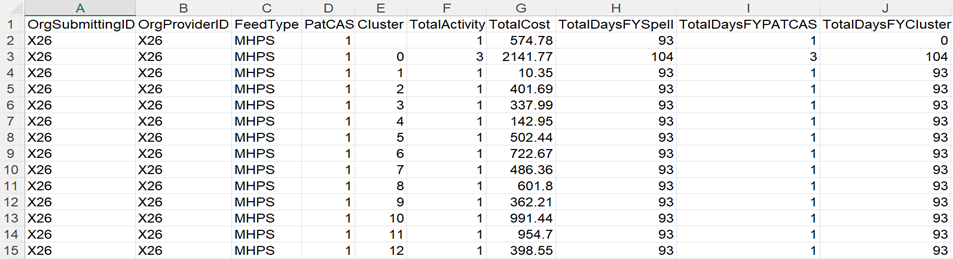
The report is broken down at trust level, ‘Feed Type’, ‘PatCAS, and ‘Cluster’ (where relevant). The column order of the report is as shown in the screenshot provided below.
PLICS_IAPT_Summary_Report
This report is produced if data for the feed type of IAPT has been submitted.
The report is broken down at trust level, ‘Feed Type’, ‘PatCAS, and ‘Cluster’ (where relevant). The column order of the reports is as shown in the screenshot provided below.

PLICS_CSCC_Summary_Report
This report is produced if data for the feed type of CSCC has been submitted.
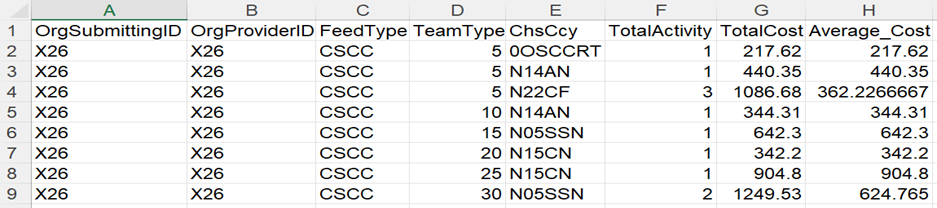
The report is broken down at trust level, ‘Feed Type’, ‘TeamType, and ‘ChsCcy’ (where relevant). The column order of the report is as shown in the screenshot provided below.
Providers may see blank reports being generated. This occurs where no data has been processed for a provider for the feed type(s) included in the report, but where data for the relevant feed type(s) has been processed in that batch.
Field mapping
The tables below map the field names in the report(s) to the field names defined in the PLICS Integrated Extract Specification to illustrate how the report(s) are compiled based on the submitted data. Details of fields which are calculated are also included with comments where relevant.
PLICS_Acute_OS_Summary_Report
| Field name (summary report) | Feed type | Field name (extract specification or calculated field) | Details for calculated field or comments |
|---|---|---|---|
| OrgSubmittingID | ALL | Organisation identifier (code of submitting organisation) | |
| OrgProviderID | ALL | Organisation identifier (code of provider) | |
| DeptCode | APC | Point of delivery | |
| EC | Patient level costing care activity type code | ||
| OP | Point of delivery | ||
| SWC | Unbundled care activity type | ||
| SI | Patient level costing care activity type code | ||
| ServiceCode | APC | Activity treatment function code | |
| EC | Emergency care department type | ||
| OP | Activity treatment function code | ||
| SWC | Critical care unit function | ||
| SI | Unbundled currency scheme In use | ||
| CurrencyCode | APC | Finished consultant episode healthcare resource group | |
| APC | Hospital provider spell healthcare resource group | ||
| EC | Healthcare resource group | ||
| SWC | Unbundled HRG | ||
| OP | Healthcare resource group | ||
| SI | Unbundled currency | ||
| EpisodeType | APC | Episode type | This will only be populated for APC and SWC feed types. For other feed types this will be left blank. |
| SWC | Critical care period type | This will only be populated for APC and SWC feed types. For other feed types this will be left blank. | |
| TotalActivity | ALL | Calculated field | This is the total activity for the unique combination of OrgSubmittingID, OrgProviderID, DeptCode, ServiceCode, CurrencyCode, EpisodeType. |
| TotalCost | ALL | Calculated field | This is the total activity for the unique combination of OrgSubmittingID, OrgProviderID, DeptCode, ServiceCode, CurrencyCode, EpisodeType. |
| Average_Cost | ALL | Calculated field | This is the total activity for the unique combination of OrgSubmittingID, OrgProviderID, DeptCode, ServiceCode, CurrencyCode, EpisodeType. |
PLICS_MHCC_Summary_Report
| Field name (summary report) | Feed type | Field name (extract specification field name or calculated field) | Details for calculated field or comments |
|---|---|---|---|
|
OrgSubmittingID |
MHCC | Organisation identifier (Code of submitting organisation) | |
|
OrgProviderID |
MHCC | Organisation identifier (Code of provider) | |
| FeedType | MHCC | Patient level costing care activity type code | |
| PatCAS | MHCC | Patient cluster assessment status | |
| Cluster | MHCC | Adult mental health care cluster code (final) | |
| TotalActivity | MHCC | Calculated field | This is the total activity for the unique combination of OrgSubmittingID, OrgProviderID, FeedType, PatCAS, Cluster. |
| TotalCost | MHCC | Calculated field |
This is the total cost for the unique combination of OrgSubmittingID, OrgProviderID, FeedType, PatCAS, Cluster. Where there are invalid scenarios, one row will be shown in the report for the total of the invalid data per combination of OrgSubmittingID, OrgProviderID and FeedType. Please also refer to 'Error conditions - ZZ values' |
| CC_AvgCostPatCASCluster | MHCC | Calculated field |
This is the average cost for the unique combination of OrgSubmittingID, OrgProviderID, FeedType, PatCas, Cluster. TotalCost/TotalActivity |
PLICS_MHPS_Summary_Report
| Field name (summary report) | Feed type | Field name (extract specification field name or calculated field) | Details for calculated field or comments |
|---|---|---|---|
|
OrgSubmittingID |
MHPS | Organisation identifier (Code of submitting organisation) | |
|
OrgProviderID |
MHPS | Organisation identifier (Code of provider) | |
| FeedType | MHPS | Patient level costing care activity type code | |
| PatCAS | MHPS | Patient cluster assessment status | |
| Cluster | MHPS | Adult mental health care cluster code (final) | |
| TotalActivity | MHPS | Calculated field | This is the total activity for the unique combination of OrgSubmittingID, OrgProviderID, FeedType, PatCAS, Cluster. |
| TotalCost | MHPS | Calculated field |
This is the total cost for the unique combination of OrgSubmittingID, OrgProviderID, Feedtype, PatCAS, Cluster. Where there are invalid scenarios, one row will be shown in the report for the total of the invalid data per combination of OrgSubmittingID, OrgProviderID and Feedtype. Please also refer to 'Error conditions - ZZ values'. |
| TotalDaysFYSpell | MHPS | Calculated field |
This calculation will give the number of days within all Spells for a given OrgSubmittingID, OrgProviderID, PatCAS and Cluster combination. The calculation for this report is restricted to the relevant financial year of the collection. |
| TotalDaysFYPATCAS | MHPS | Calculated field |
This calculation will give the number of days within the PatCAS for a given OrgSubmittingID, OrgProviderID, PatCAS and Cluster combination (across all spells for this combination). PatCAS dates are restricted to the relevant financial year of the collection. |
| TotalDaysFYCluster | MHPS | Calculated field |
This calculation will give the number of days within the CLUSTER for a given OrgSubmittingID, OrgProviderID, PatCAS and Cluster combination (across all spells for this combination). The calculation for this report is restricted to the relevant financial year of the collection. |
PLICS_IAPT_Summary_Report
| Field name (summary name) | Feed type | Field name (extract specification field name or calculated name) | Details for calculated field and comments |
|---|---|---|---|
| OrgSubmittingID | IAPT | Organisation identifier (Code of submitting organisation) | |
| OrgProviderID | IAPT | Organisation identifier (Code of provider) | |
| FeedType | IAPT | Patient level costing care activity type code | |
| PatCAS | IAPT | Patient cluster assessment status | |
| Cluster | IAPT | Adult mental health care cluster code (final) | |
| TotalActivity | IAPT | Calculated field | This is the total activity for the unique combination of OrgSubmittingID, OrgProviderID, Feedtype, PatCAS, Cluster. |
| TotalCost | IAPT | Calculated field |
This is the total cost for the unique combination of OrgSubmittingID, OrgProviderID, Feedtype, PatCAS, Cluster. Where there are invalid scenarios, one row will be shown in the report for the total of the invalid data per combination of OrgSubmittingID, OrgProviderID and Feedtype. Please also refer to 'Error conditions - ZZ values'. |
|
AvgCostPatCASCluster |
IAPT | Calculated field |
This is the average cost for the unique combination of OrgSubmittingID, OrgProviderID, Feedtype, PatCAS, Cluster. TotalCost/TotalActivity |
PLICS_CSCC_Summary_Report
| Field name (Summary report) | Feed type | Field name (Extract specification field name or calculated field) | Details for calculated field or comments |
|---|---|---|---|
| OrgSubmittingID | CSCC | Organisation identifier (Code of submitting organisation) | |
| OrgProviderID | CSCC | Organisation identifier (Code of provider) | |
| FeedType | CSCC | Patient level costing care activity type code | |
| TeamType | CSCC | Service or team type referred to (Community care) | |
| ChsCcy | CSCC | Community Health Services PLICS Currency | |
| TotalActivity | CSCC | Calculated field |
This is the total activity for the unique combination of OrgSubmittingID, OrgProviderID, FeedType, TeamType, ChsCcy. |
| TotalCost | CSCC | Calculated field | This is the total cost for the unique combination of OrgSubmittingID, OrgProviderID, FeedType, TeamType, ChsCcy. |
| Average_Cost | CSCC | Calculated field |
This is the average cost for the unique combination of OrgSubmittingID, OrgProviderID, FeedType, TeamType, ChsCcy. TotalCost/TotalActivity |
Error Conditions – ZZ Values
PLICS_Acute_OS_Summary_Report
Not applicable for this report.
PLICS_MHCC_Summary_Report
Within the PLICS_MHCC_Summary_Report, one scenario below is considered for erroneous records, as below (XML Field Names used):
- When PatCAS = ('02' or '03' or '04') and Cluster is populated
When the above scenario is true, the erroneous records are not included for any calculations in the report.
These records are instead grouped together by OrgSubmittingID, OrgProviderID and FeedType, with their PatCAS and Cluster column values in the report overwritten as ‘ZZ’ to denote that there is invalid data for a specific FeedType from a trust.
PLICS_MHPS_Summary_Report
Within the PLICS_MHPS_Summary_Report, the scenarios below are considered for erroneous records, as below (XML Field Names used):
- When (PatCASStDte is greater than PatCASEndDte) or (StartDateCareClust is greater than EndDateCareClust)
- When PatCAS = ('02' or '03' or '04') and Cluster is populated
- When PatCAS = ('02' or '03' or '04') and StartDateCareClust is populated and EndDateCareClust is populated
- When Cluster is blank/null and (StartDateCareClust is populated and/or EndDateCareClust is populated)
- When Cluster is populated and (StartDateCareClust is blank/null and/or EndDateCareClust is blank/null)
When any of the above 5 scenarios are true, the erroneous records are not included for any calculations in the report.
These records are instead grouped together by OrgSubmittingID, OrgProviderID and FeedType, with their PatCAS and Cluster column values in the report overwritten as ‘ZZ’ to denote that there is invalid data for a specific FeedType from a Trust. Note that both the PatCAS and Cluster column will be populated with ‘ZZ’ where any of the above 5 scenarios are true.
PLICS_IAPT_Summary_Report
Within the PLICS_IAPT_Summary_Report, one scenario is considered for erroneous records, as below (XML Field Names used):
- PatCAS = ('02' or '03' or '04') and Cluster is populated.
When the above scenario is true, the erroneous records are not included for any calculations in the report.
These records are instead grouped together by OrgSubmittingID, OrgProviderID and Feedtype, with their PatCAS and Cluster column values in the report overwritten as ‘ZZ’ to denote that there is invalid data for a specific Feedtype from a Trust. Note that both the PatCAS and Cluster column will be populated with ‘ZZ’ where the above scenario is true.
PLICS_CSCC_Summary_Report
Not applicable for this report.
Last edited: 25 July 2022 11:57 am