Part of PLICS guide 2022 ambulance trust specific summary report
Accessing the report(s) using SEFT
The Secure Electronic File Transfer (SEFT) system’s function is to transfer files securely into and out of NHS Digital. This is the same system used to submit your PLICS data.
Logging on to SEFT
We will have issued you with a user name and password to submit your PLICS data. Please use this user name and password to access your PLICS_AMB_Summary_Report.
To login to SEFT
1. Log in to https://www.seftprod.hscic.gov.uk
2. Enter your user name and password.
3 Click on sign on.
SEFT dashboard
The SEFT dashboard homepage is where you will see the transfers (downloads) available to you to access.
You will be able to see the SEFT dashboard, including the transfers (downloads available once you have logged in.

1. Select PLICS_Ambulance_Trust_Summary_Report under the transfer name.
2. Click on the above transfer name, this will take you to the folder for your organisation
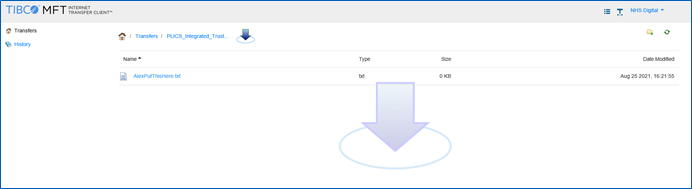
3. Click on the file.
4. An arrow icon will appear at the bottom of the screen.
5. Click on the arrow icon to open the file.
Last edited: 16 September 2021 8:53 am