Single Point of Access (SPoA) services in e-RS
The NHS e-Referral Service (e-RS) introduced the functionality to support elective Single Points of Access (SPoAs). SPoA is a model in which all Advice and Guidance (A&G) requests and elective referrals are directed to a single digital entry point at specialty or sub-specialty level within secondary care.
From October 2026, the NHS e-Referral Service (e-RS) introduced the functionality to support elective Single Points of Access (SPoAs).
Enhancements will be delivered incrementally. The initial phase allows e-RS Service Definers to set specific e-RS services as SPoA services and a new ‘Single point of access’ label helps referrer and provider users identify SPoA services from all other service types during service searching and when onward referring. The October release also included a technical update to align e-RS Pathway start date with RTT Policy requirements and capture the referrer’s advice intention.
Further user experience enhancements are planned for Release 17.0 in November 2026 (subject to final testing). These changes will make it clearer when users have selected, viewed or are communicating with a Single Point of Access service.
The changes will introduce additional SPoA labelling across referral and Advice and Guidance workflows, including the 'review details before you confirm' screen, service details pages and screens used during new, ongoing and ended Advice and Guidance conversations.
About Single Point of Access (SPoA)
Elective SPoA is a model in which all Advice and Guidance (A&G) requests and elective referrals, except those for urgent suspected cancer, are directed to a single digital entry point at specialty or sub-specialty level within secondary care.
A specialist clinical review will take place within e-RS, or within an integrated clinical system, to determine the most clinically appropriate next step or outcome for the patient. This may include advice, straight-to-test diagnostics, onward referral, another management pathway, or communication with the patient and referrer in line with local guidance.
Single Point of Access (SPoA) services in e-RS
Change to the calculation of the e-RS Pathway Start Date
The calculation of the e-RS pathway start date is updated, to align with existing RTT rules. For A&G requests converted directly into referrals, by the service provider, e-RS uses the original request date as the e-RS pathway start date rather than the conversion date. The change only impacts requests raised after release 16.9.
Further information is available on the e-RS pathways start date page.
Following release 16.9, e-RS Service Definers can set specific SPoA services via ‘View all services’ and ‘Select supported request types’ in the Directory of Services (DoS).
The supported request types section includes a new ‘Is this a single point of access service?’ question – choosing ‘Yes’ will define the service as a SPoA service.
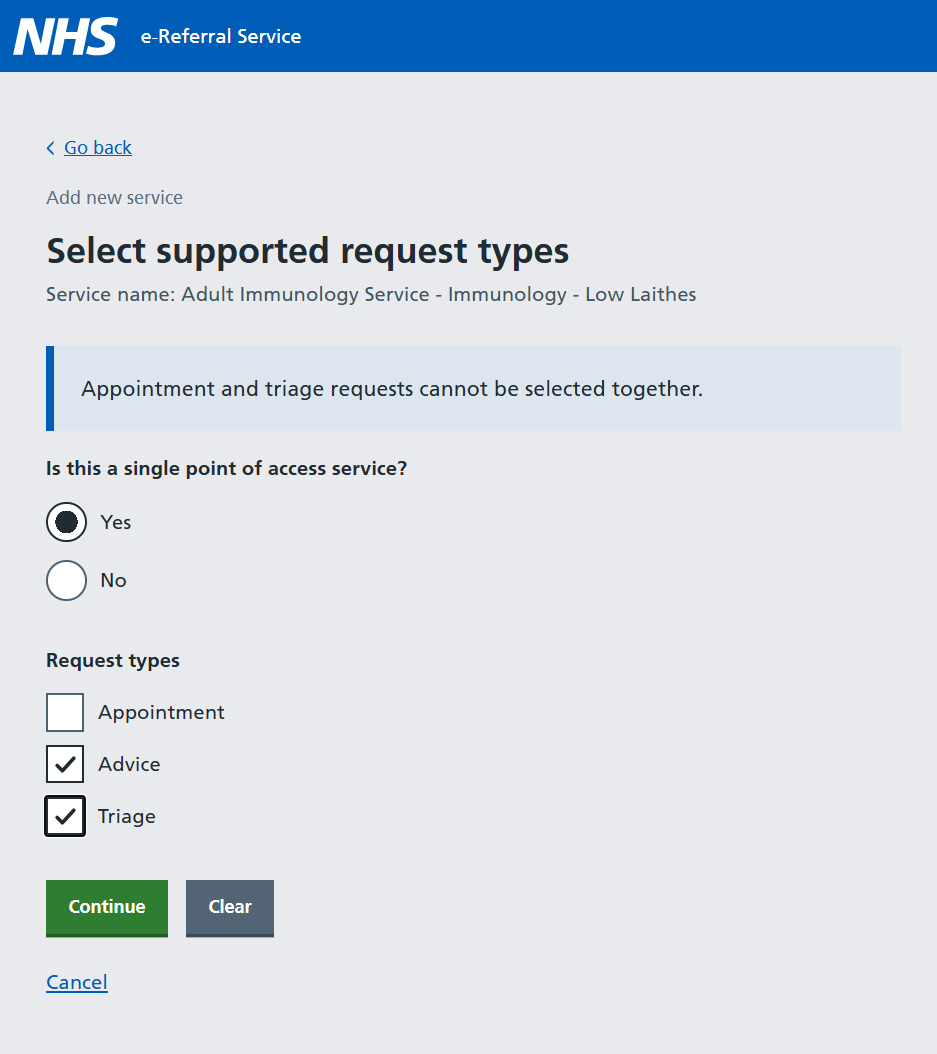
Each SPoA service can be configured using one of 3 request-type combinations. Further information including considerations and benefits for each request type combination is available on the NHS e-RS Futures page (login required).
In summary, the supported combinations for setting up SPoAs are:
- using both ‘Advice’ and ‘Triage’ Request types— this is the recommended option
- ‘advice’ only; or
- ‘triage’ only
Providers should select the SPoA model that best supports each specialty’s clinical and operational processes. The combined model is recommended; advice-only or triage-only models should be used only where this has been agreed locally with GPs and commissioners.
SPoA services cannot support the ‘Appointment’ request type. If ‘Appointment’ is selected for a service identified as a SPoA, an error message will be displayed, and it won’t be possible to continue if this option is selected.
Restricting services behind SPoA Services
Service Definers must ensure all other services that share the same specialty and clinic type as any SPoA services are restricted so that initial referrers see only one SPoA when creating a request. Restricted services can continue to support triage or appointment requests, including Clinical Assessment Services.
Service restrictions are managed through ‘View all services’ in the DoS. Providers can enable restrictions for other services by using the options:
Authorised services: use the Service ID of the relevant SPoA to permit onward referral to the service being restricted.
Authorised organisations: use the provider ODS code to allow any SPoA service in that organisation to refer to other services across specialties.
Using ‘Authorised organisations’ when restricting services will provide the greatest flexibility as any service including new SPoA services within the organisation will be able to onward refer or redirect to the restricted service across different specialties, if required.
If applying restrictions to existing triage or appointment services, providers must ensure UBRNs referred into these services prior to SPoA go-live are managed appropriately.
Please visit the e-RS Restricting Services page for more information.
The introduction of SPoAs has the following impact on referrer processes, including:
- a new ‘Single point of access’ label has been introduced for SPoAs
- when requesting advice, a new ‘Advice Intention’ screen will be presented
Sending a Referral Request into a SPoA
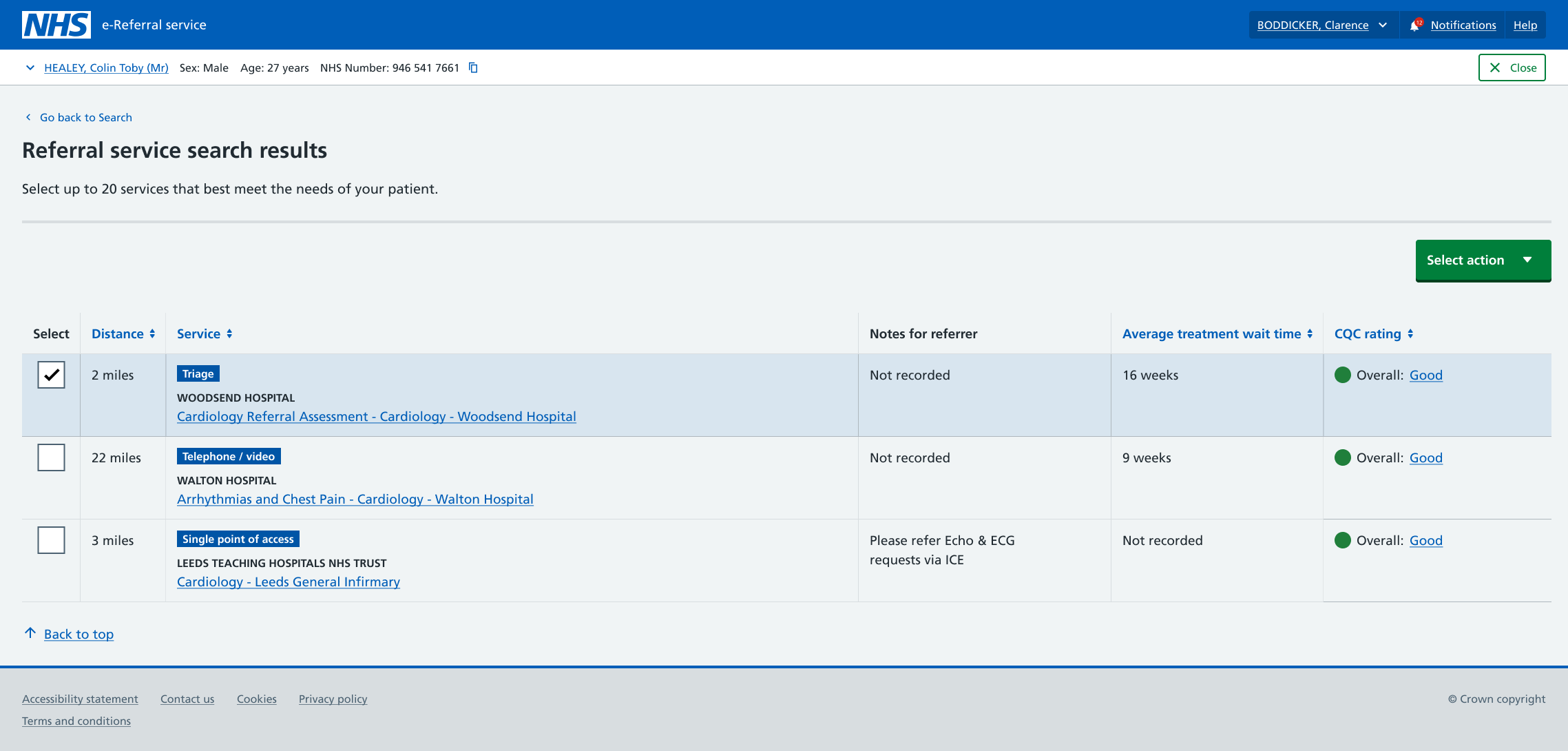
Referrers will continue to initiate a new e-RS referral in the usual way. When searching for appropriate referral services, SPoA services display a the new ‘Single point of access’ label next to the service name.
In the referral workflow, users may select a single SPoA service to refer to or include a SPoA in a shortlist of multiple services.
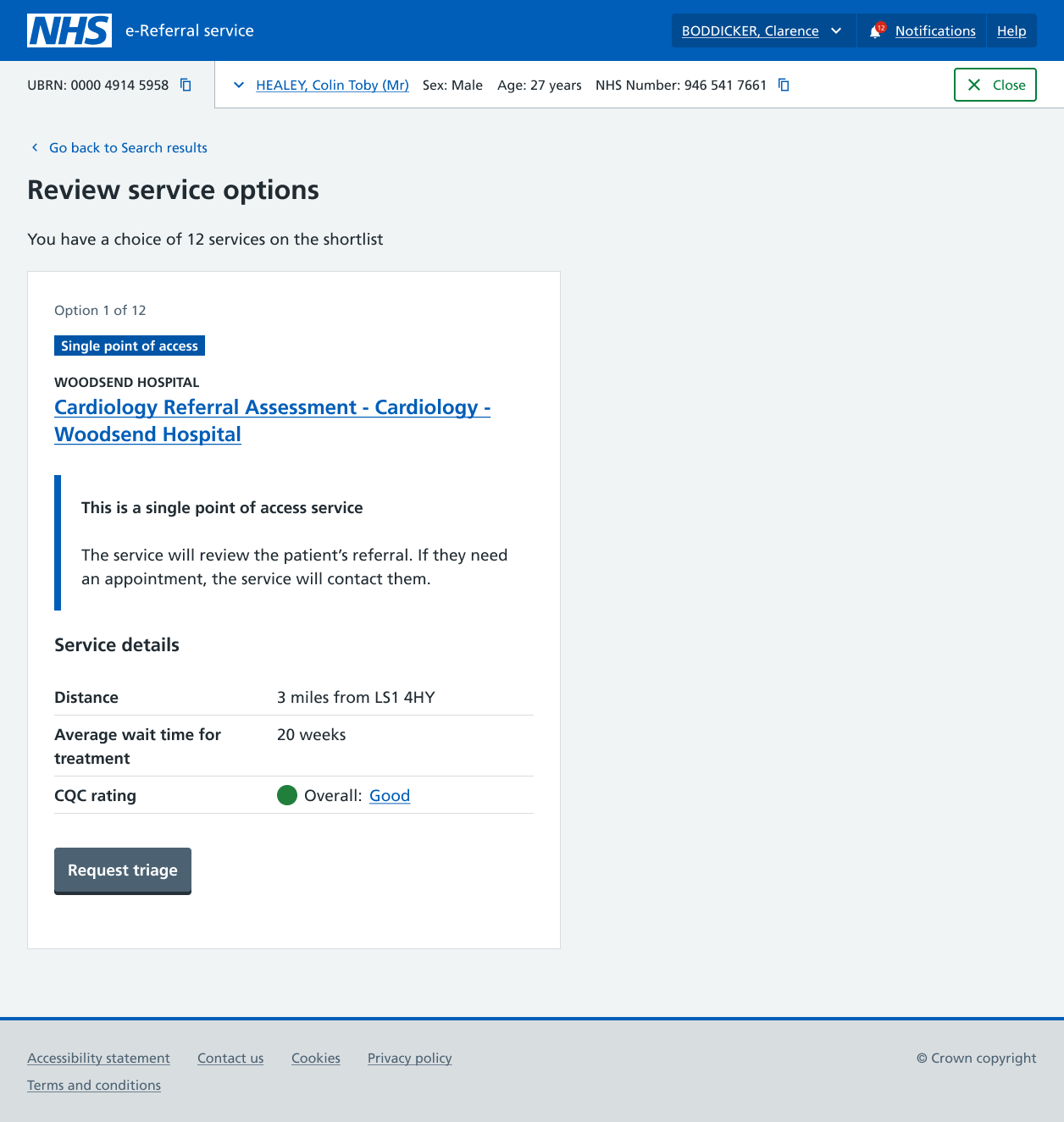
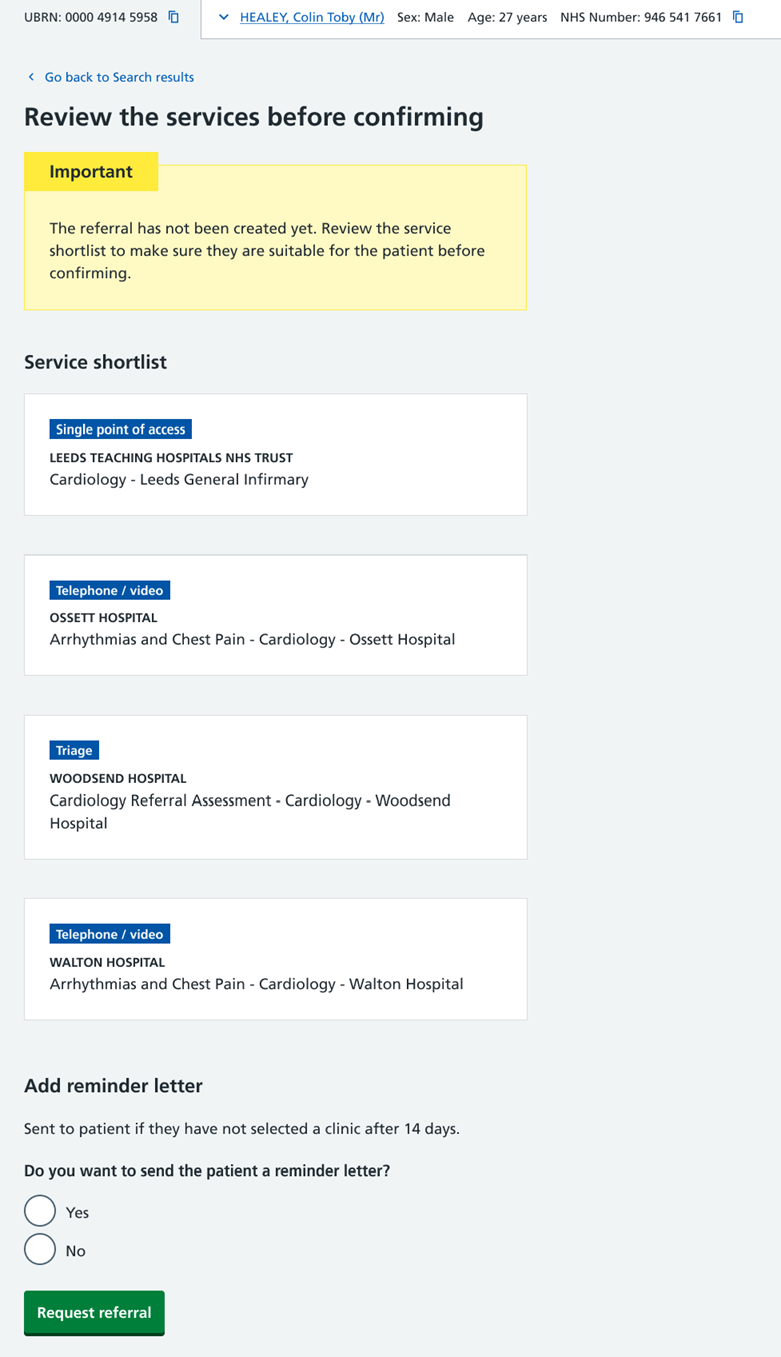
The Single point of access label is also displayed on the Review service Options page when a single SPoA is selected.
The final confirmation page is also updated for referrals submitted successfully to be triaged by the selected provider.
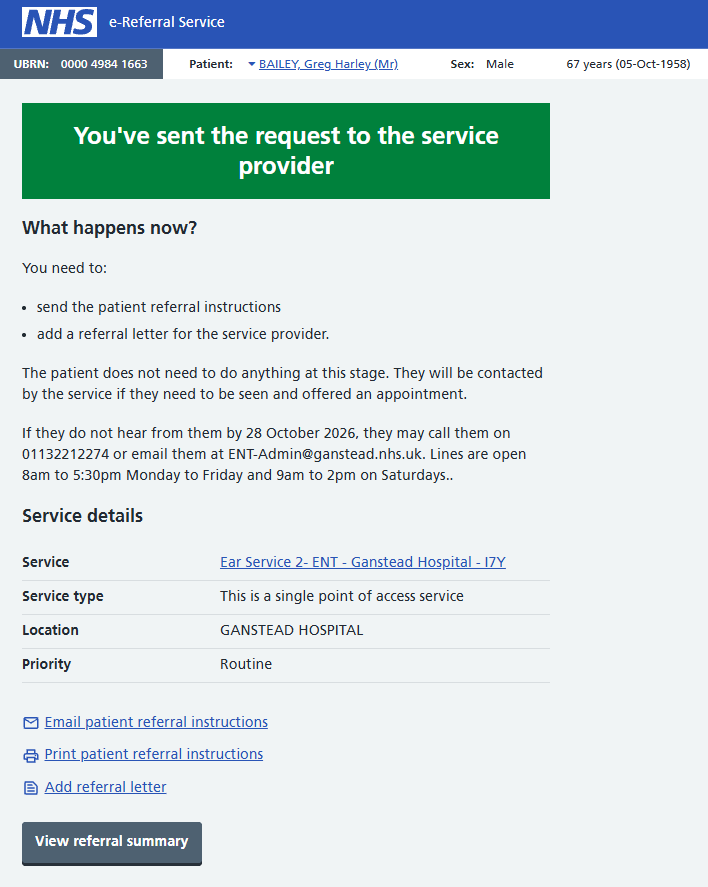
‘Triage’ has been removed from the confirmation message so that the wording applies appropriately to any referral request, including referral requests into a SPoA service.
No changes have been made to patient communications.
If a SPoA service is included in a referral shortlist, the ‘Single point of access’ label will appear alongside the SPoA service in the shortlist.
Sending an Advice Request into a SPoA
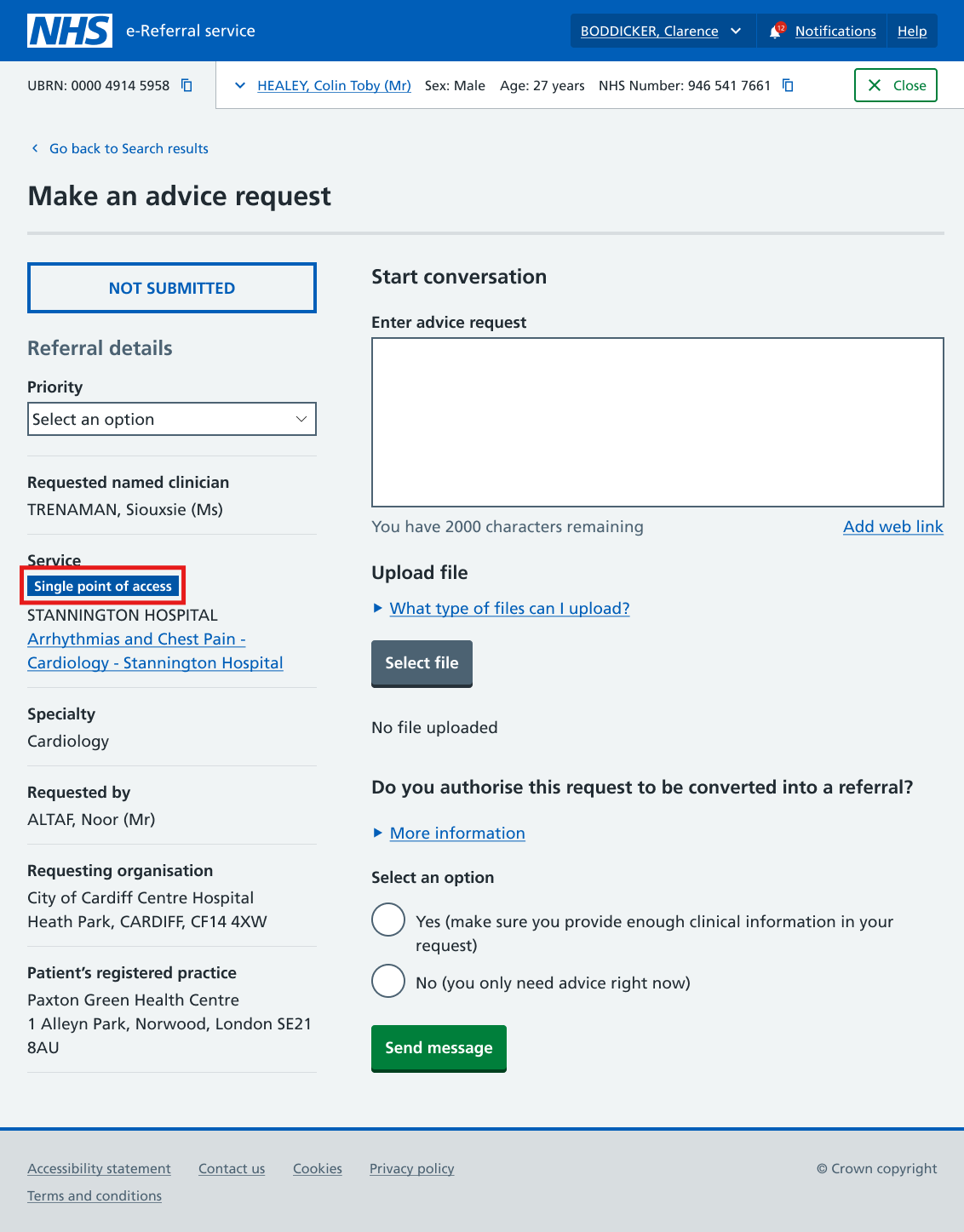
Referrers will continue to initiate a new e-RS Advice and Guidance (A&G) request in the usual way. When searching for appropriate A&G services, SPoA services display the new ‘Single point of access’ label next to the service name.
In addition, for all new advice requests referrers can see a new advice intention screen before the service search screen and are asked to record the reason for seeking advice.
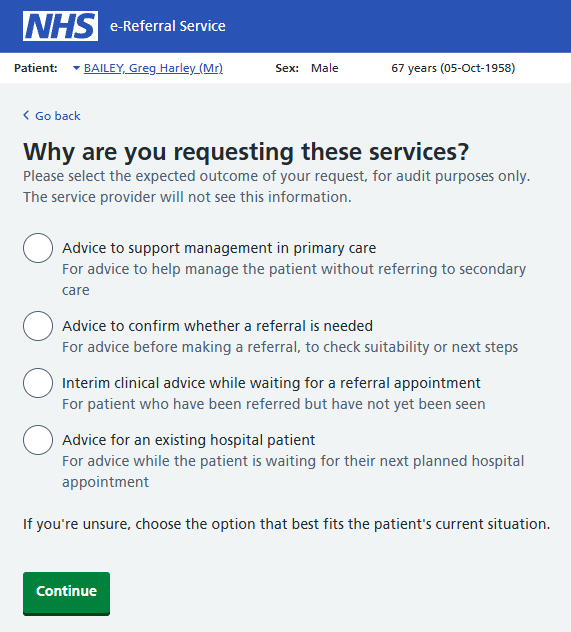
The selected outcome chosen on this screen is used in reporting to support a clearer understanding of the different types of Advice and their impact on elective activity.
The selected option is not presented to the clinician responding to the advice request.
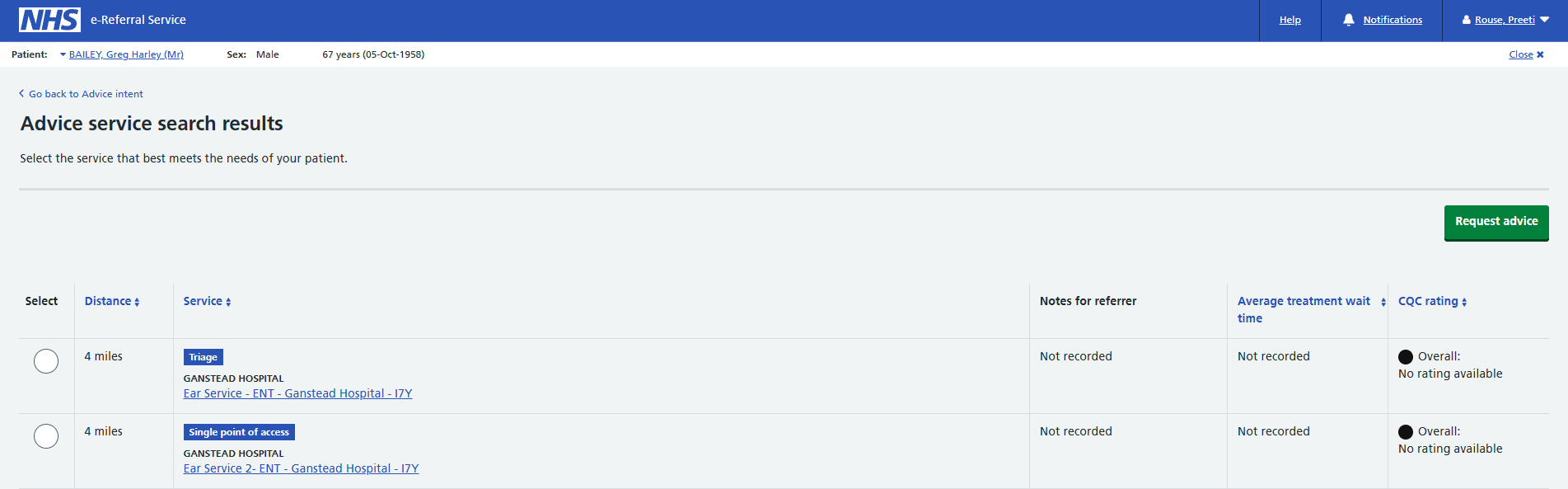
From the Advice service search results screen users can select an appropriate SPoA or other service to seek advice from as appropriate.
Service Provider screens to support onward referrals has also been updated to help identify Single Points of Access (SPoA) services.
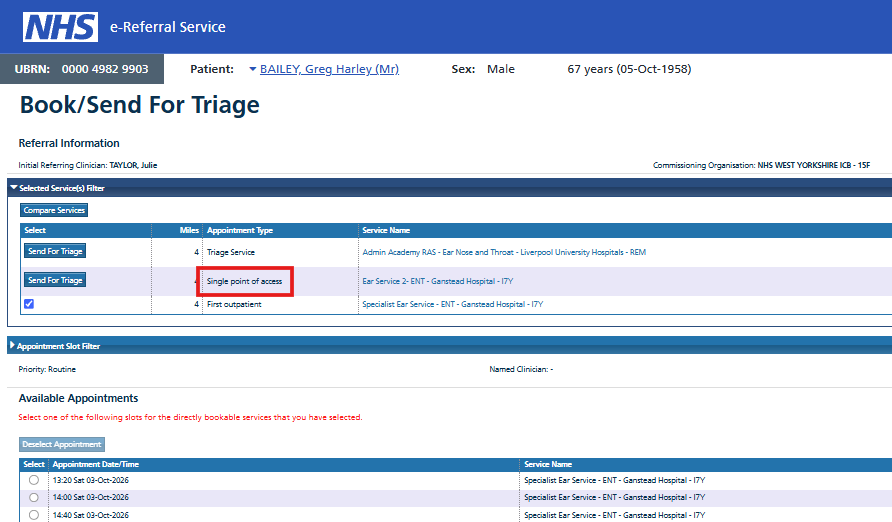
When onward referring, SPoA services display ‘Single point of access’ in the Appointment Type column.
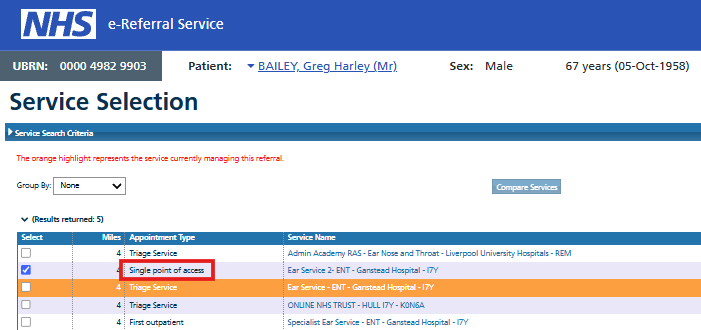
This label remains visible in the Appointment type column when one or more services are selected for ‘Book/Send for Triage’.
Release 17.0 user experience enhancements
Release 17.0 will introduce further user experience enhancements to help referrers and providers recognise SPoA services throughout the referral and Advice and Guidance workflows.
Referral review screen
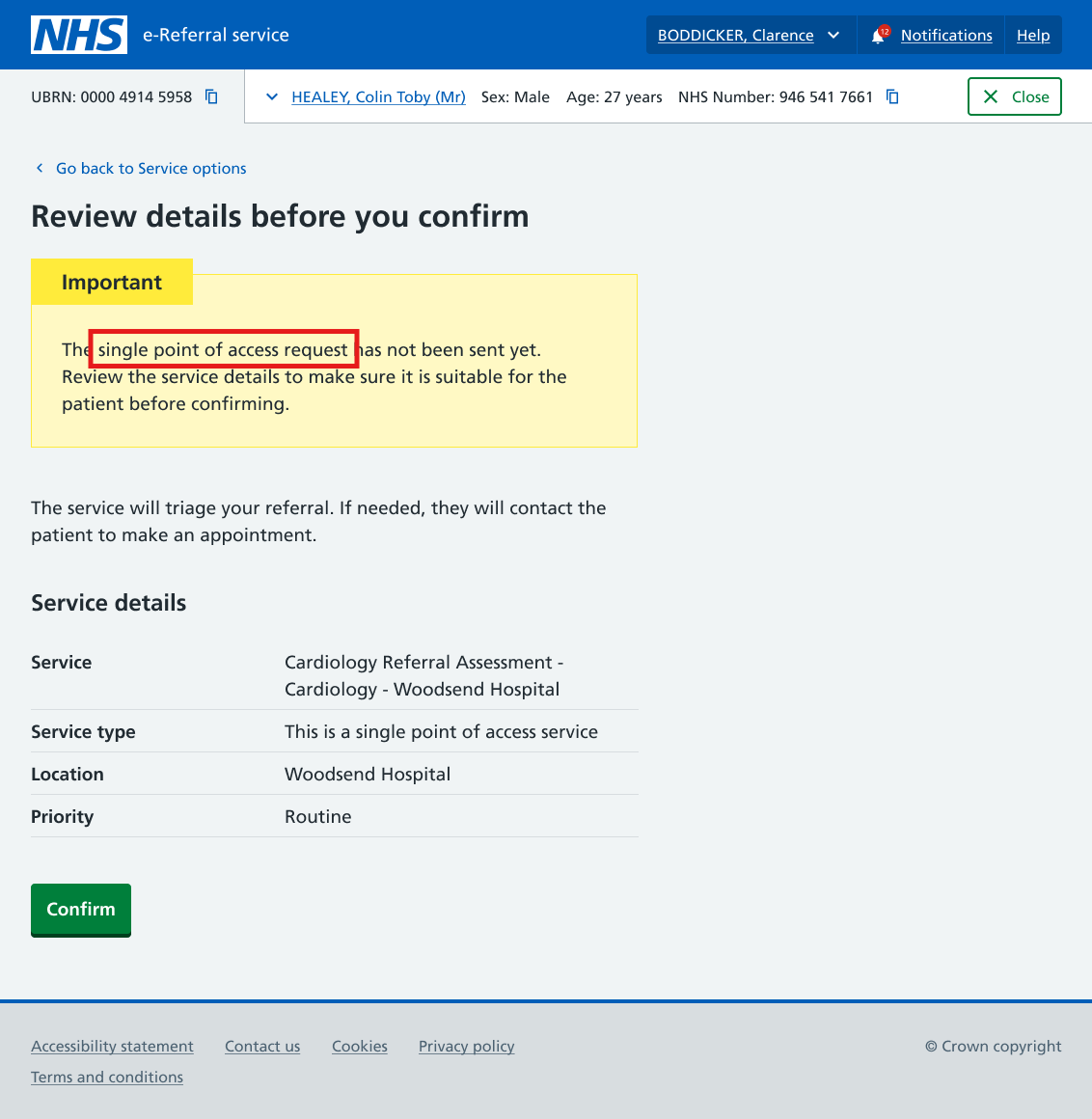
When a user has selected a SPoA service for a referral, the information displayed on the review details screen will be updated.
Currently, a referral to SPoA displays the the request type as 'triage'.
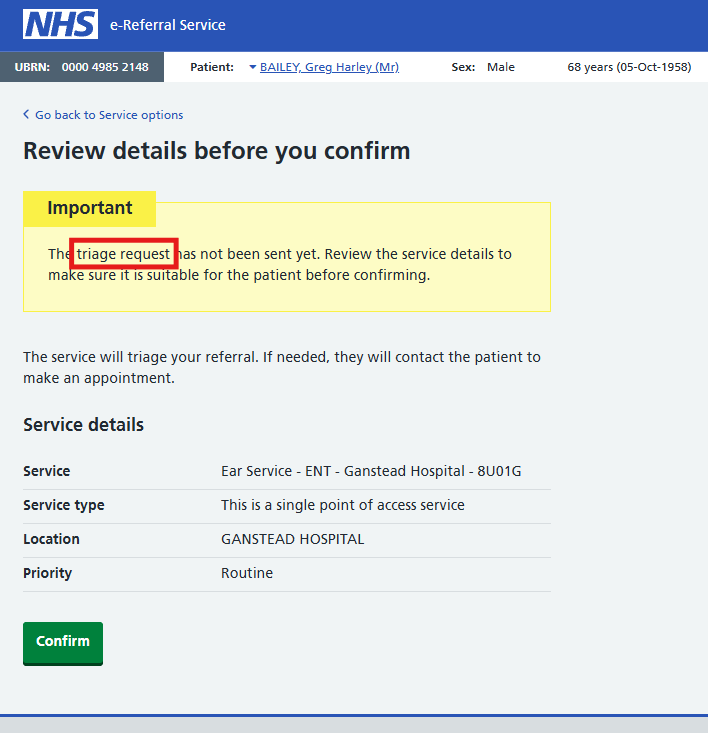
After the release, the message will replace the 'triage' request with 'single point of access' request as highlighted below.
Service details pages
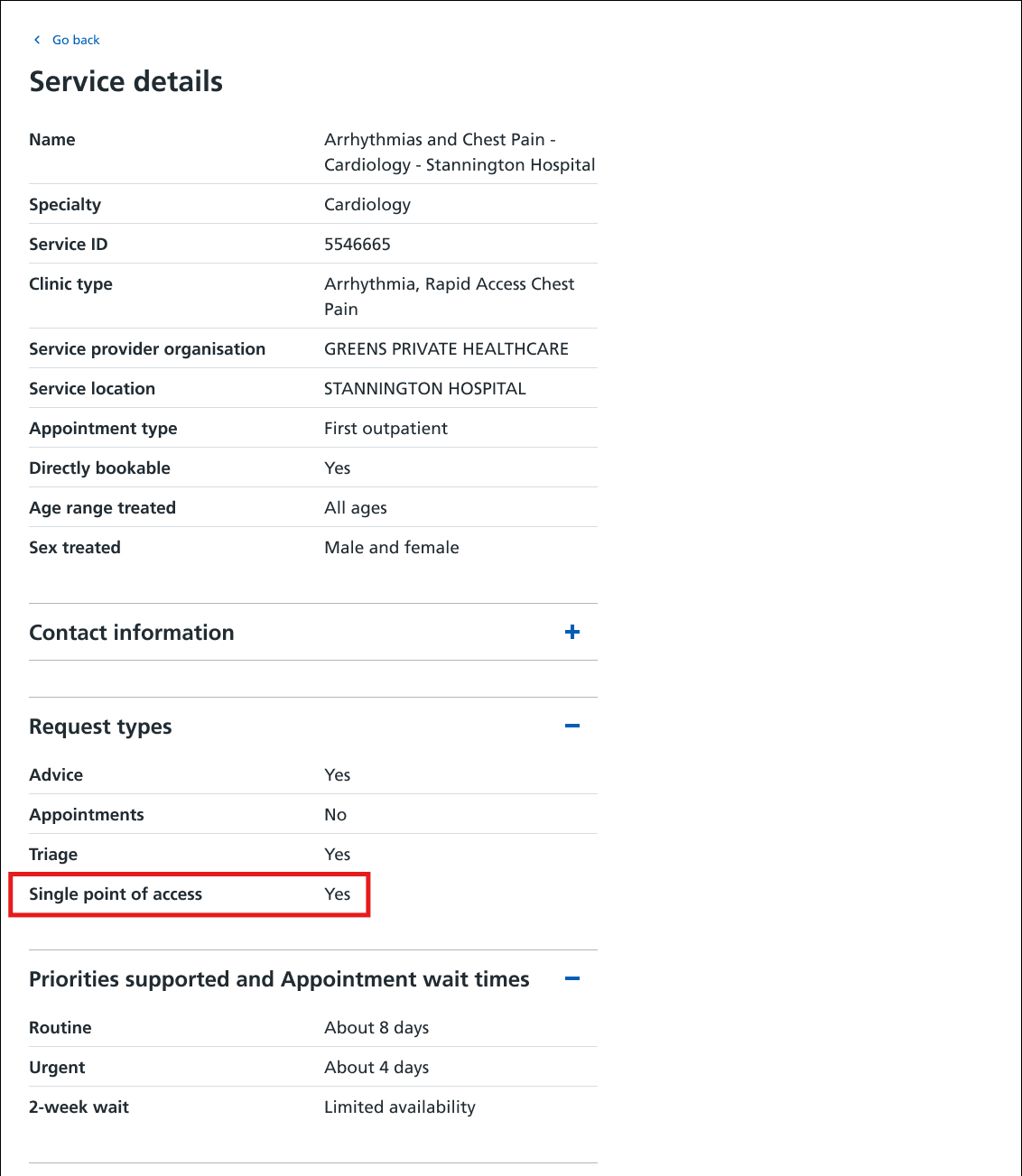
Additional SPoA labelling will be displayed alongside the supported request types on service details pages. This will help both referrers and providers identify that the service is configured as a Single Point of Access service.
Advice and Guidance conversations
SPoA labelling will be displayed throughout an Advice and Guidance conversation. This will help referrers recognise that they are communicating with a SPoA service when making an advice request, while the conversation is ongoing and after it has ended.
Further information
Guidance for implementing e-RS SPoA services should be reviewed alongside the FutureNHS Elective SPoA Technical Guidance for 2026/27 (login required), relevant local standards and supporting e-RS guidance on defining and maintaining Directory of Services entries, RAS worklist management, Advice and Guidance worklist management and restricted services.
Organisations should use this guidance to support local planning and implementation, ensuring that service configuration, clinical and operational processes, staff training, governance arrangements and communications are agreed before go-live. SPoA functionality will continue to develop incrementally. Users should check the national elective SPoA guidance and relevant local guidance for the latest information before implementing or changing local SPoA arrangements.
Last edited: 19 October 2026 5:01 pm