Changes to file attachments in the NHS e-Referral Service
Several changes are planned or have been delivered to enhance file attachments in the NHS e-Referral Service (e-RS)
Work is underway to enhance the current file attachment functionality provided within the e-RS. When fully implemented e-RS users, including Application Programming Interface (API) partners, will be able to upload and download files of up to 100MB, and in addition virus scanning will be enhanced.
This work will be carried out in an incremental approach.
Increasing the maximum file size to 100MB
Allowing files of up to 100MB per attachment to be uploaded and downloaded, compared to the previous 5MB, will make it easier for clinicians to share high resolution images, such as DICOM files for medical imaging or tele dermatology. This will support clinical teams to undertake more effective triage, safely, without work arounds.
All users of web-based e-RS (Professional Application) will be able to take advantage of the increased capability, once all functional changes have taken place.
Availability of new features in integrated systems (for those who access e-RS from within an existing IT system) will depend on the system supplier making updates to their application/s.
Files attached through GP clinical systems using HL7 will display as 'Available'.
Incremental changes
Below are the changes that are planned and those that have already been completed.
Enhancing virus scanning – delivered August 2026
Introducing enhanced security measures, with the addition of new virus scanning capability to complement existing robust systems used across the NHS.
How it works for referrers and providers
Uploading files
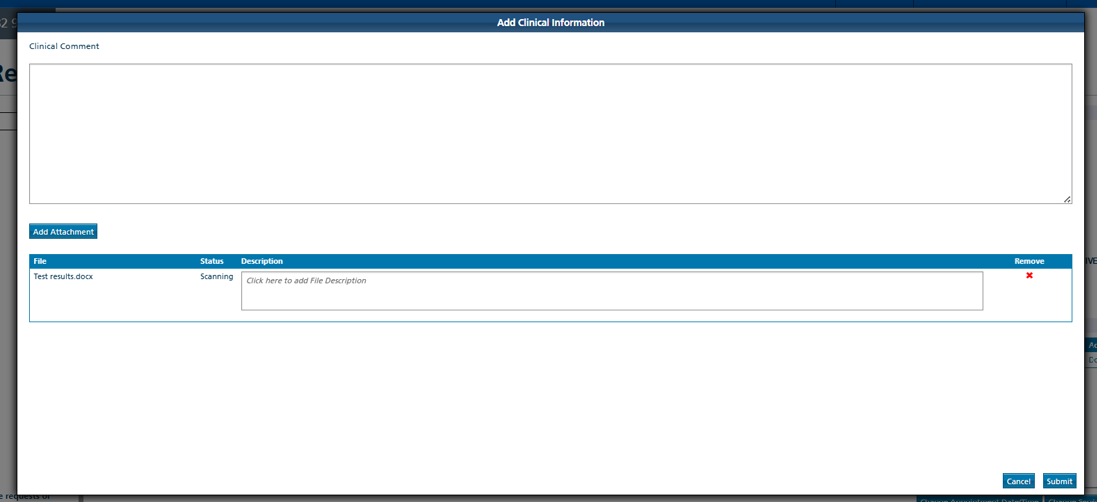
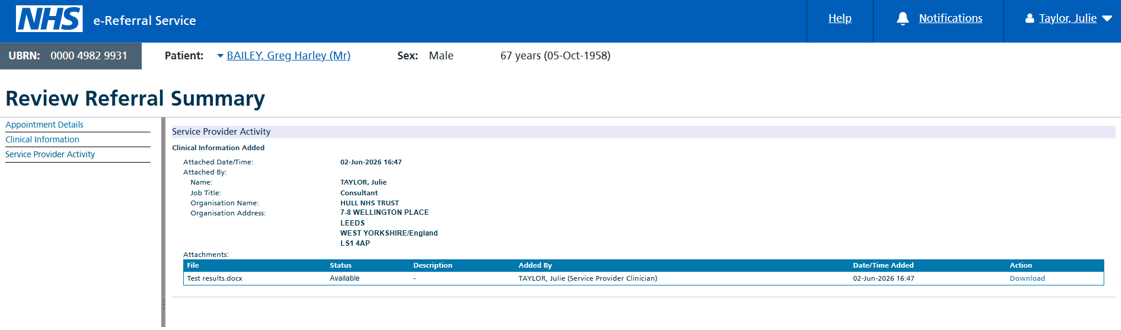
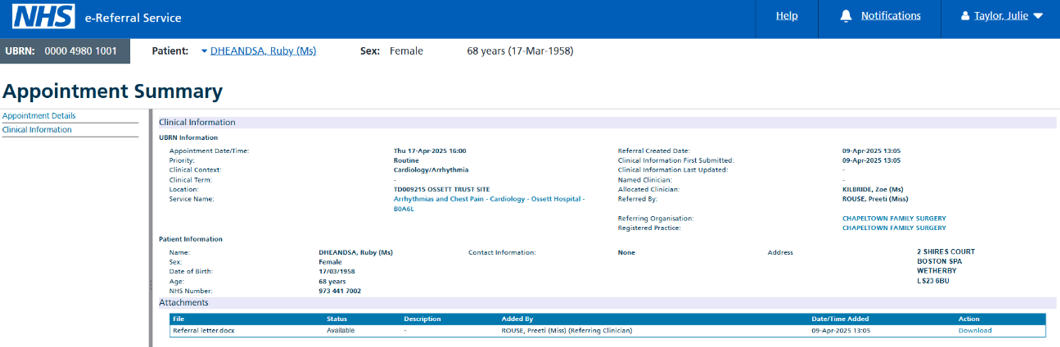
When files are uploaded from web-based e-RS a new Status column displays a ‘Scanning’ status. While the file is being scanned, the file cannot be opened. The page will not refresh the scanning status automatically. Files attached via clinical systems will show a status of ‘Available’.
Referrer example: 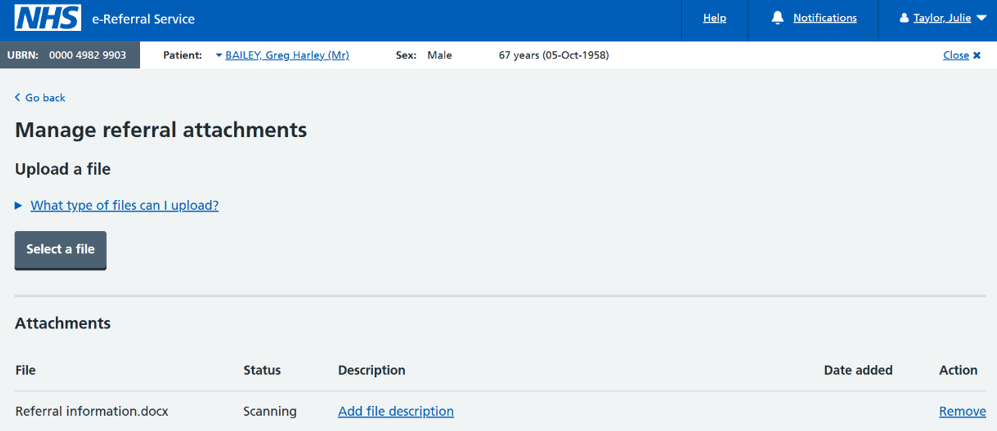
Provider example:
Viewing files
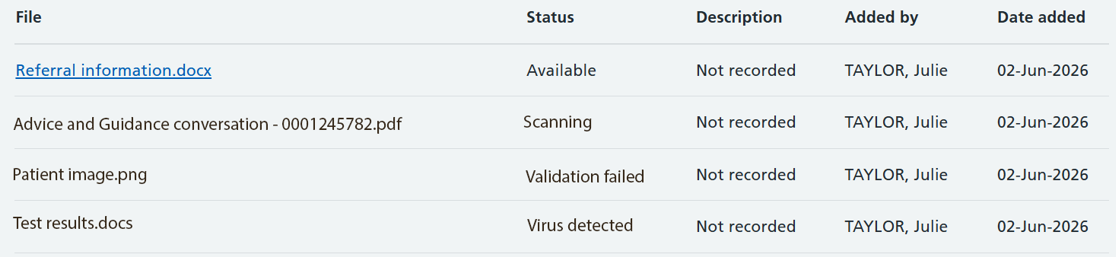
The following statuses will be displayed to users depending on the success of the virus scan:
-
‘Available’ – file has been scanned successfully and is available to download or preview
-
‘Scanning’ – file is being scanned and cannot be accessed
-
‘Virus detected’ – malware/virus has been detected on the file and the user will not be able to download the file
-
‘Validation failed’ - an issue occurred when scanning, for example, the file could be password protected, the file was corrupted, etc, so scanning could not be performed and the user will not be able to download the file
Users will need to refresh the page to see any updated status e.g. from scanning to available.
Referrers will see the following layout and files which can be accessed will be shown as a hyperlink.
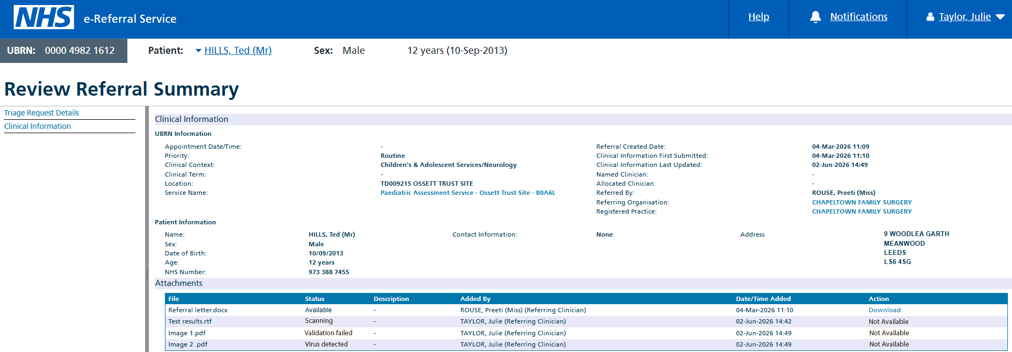
When providers are reviewing referrals, they will see the status of each file. Where the files have been virus scanned successfully an option to access the information will be shown in the Action column.
Changes to the screen layout will impact providers using robotic automated processes (RPAs).
The images below are when providers are reviewing a referral:
Impact to RPA users
These updates will change the layout to some e-RS screens, it will likely impact robotic processes (RPAs) which are in use and interact with e‑RS to manage or download e‑RS attachments.
To support RPA users, we can confirm that the changes planned for the August release are already available within the e‑RS Integration (INT) environment.
Underlying technical changes to how attachments are accessed – delivered in July 2023
Attachments, such as referral letters and proformas, are documents that have been saved to the system related to a referral. The way these attachments are accessed is changing to enable larger files to be sent. Attachments will be accessed directly to and from the e-RS attachments store via a secure link. The first stage of this change, which took place in July 2023, is for the 'downloading' of attachments only. This change was not apparent to users as the change happened in the background.
Changes to uploading attachments (including ability to upload files up to 100MB) will be delivered at a later date. This page will be updated once more information is available.
Attachment display – delivered in July 2023
Previously once an attachment was uploaded to e-RS the user could click on the file name from the upload screen (referral attachment screen, additional clinical information screen, triage outcome screen, etc) to open it. This change makes it no longer possible to click on the file name to open the file as the file name appears as text only.
Users can still access the attachment once they close the file attachment upload screen. This can be done as per current process. For example, when searching for the UBRN.
This change was necessary for the work required to enhance e-RS attachments.
New reveal information when referrers attach clinical information - delivered in May 2023
A new reveal has been added to the referrer's ‘Add attachments’ screen where it can be expanded to reveal current permitted file types and file size.
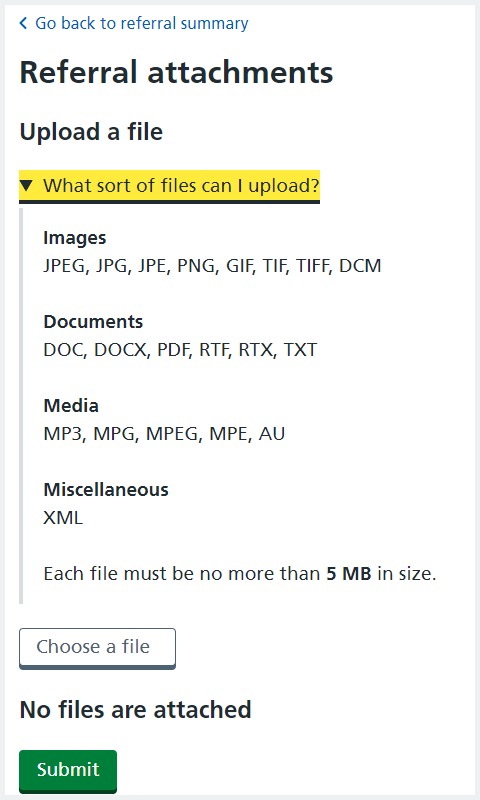
This change took place on the 30 May 2023.
Enabling DICOM file types - delivered in December 2021
e-RS supports DICOM file types. This change was one of the technical preparatory activities for allowing larger and more file types to be supported by e-RS. However, please note that the existing limits on file sizes currently still apply.
This change only applies to users accessing e-RS through the web-based portal or new Application Programming Interfaces (APIs) and not through integrated referrer systems.
Benefits of these changes
Benefits of these changes include:
- improves the quality of information sent with a referral ensuring effective triage and improved patient experience
- allows all the pertinent information to be sent with the referral thus a more effective triage, while improving patient experience
- allows API Partners to meet these user needs and reduces the need for work arounds
-
improvements for both patients and users (for example, will allow more detailed images and larger files in general to be shared between NHS services – allowing more seamless referrals, time savings, potential for earlier remote diagnosis and better patient care)
Last edited: 24 August 2026 10:28 am