Part of Using Databricks in the NHS England Secure Data Environment
Starting your cluster
A cluster is a set of computation resources and configurations on which you run data engineering, data science and data analytics workloads.
Your cluster needs to be running for you to access your data.
Click on Compute to check the state of the cluster.
If the State shows a black circle, this means the cluster is not running. You will need to start it by clicking on the play-button icon.
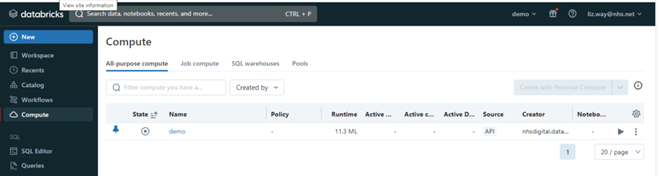
If the State shows a green tick, this means your cluster is already up and running.

Last edited: 23 April 2026 3:47 pm