Onboarding to the National Imaging Registry (NIR)
The digital onboarding journey for the National Imaging Registry (NIR).
Overview
The National Imaging Registry (NIR) is a secure, system-to-system integration service. It does not have its own user interface and does not replace local imaging systems.
It enables authorised diagnostic systems to:
- query a patient’s imaging history
- retrieve diagnostic metadata, reports and images
- access information across organisational boundaries
- support direct care clinical workflows
NIR onboarding is the process of connecting to this integration (API) Service. The process is fully digital, and is accessed by the NHS England Developer and Integration Hub wand completed using the Digital Onboarding Service (DOS).
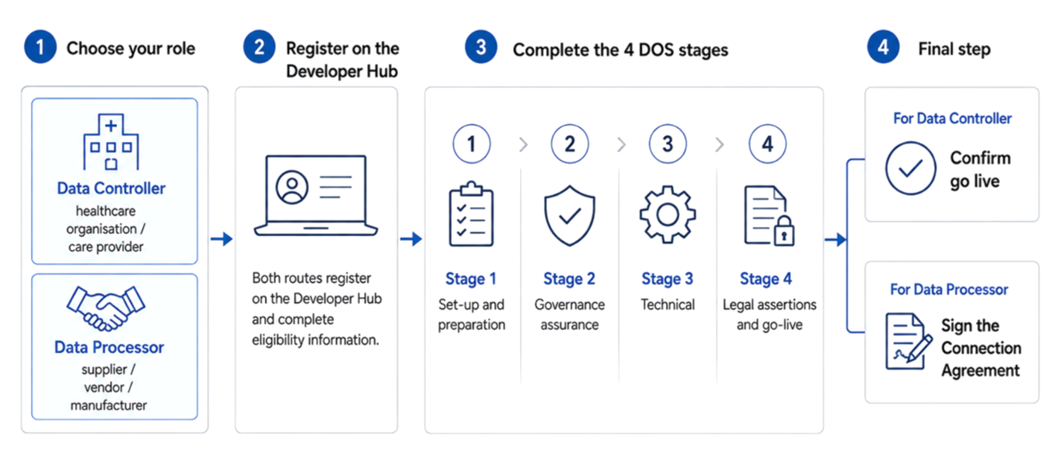
We’re here to support you
You don't need to complete the NIR onboarding journey alone. The NIR team is available to help you understand the process, prepare the required information and work through each stage as smoothly as possible.
Use the Further support section to contact us, raise a Service Desk request or visit the Developer Community. You can also use the Further information links at the bottom of this page to access related guidance and resources.
We're also running fortnightly Drop-In Sessions.
Our aim is to make onboarding clear, straightforward and easy to navigate, with support available when you need it.
Start here
Before starting NIR onboarding, all organisations and suppliers should complete the following steps:
- Register with the Developer and Integration Hub if you have not already done so. This is where you will access the Digital Onboarding Service (DOS) and complete your NIR assurance requirements.
- Register with the National Service Desk if you do not already have access. The Service Desk is used to raise NIR onboarding questions and support requests.
- Complete the appropriate NIR use case form and save a copy after submitting so the NIR Service Team can understand what you are connecting, how you intend to use NIR and confirm your eligibility:
- EUOs/Healthcare organisations: complete the Healthcare Organisation use case form
- Suppliers and vendors: complete the Supplier/Vendor use case form
Importantly, use the onboarding guidance and supporting resources provided on this page throughout your onboarding journey. These materials explain how to approach the DOS questions, what information and evidence may be required for your route, and where to find the relevant templates and supporting documentation.
Choose your onboarding route
NIR onboarding is divided into two routes: Data Controllers and Data Processors. The routes are connected, but the questions, responsibilities and evidence required during onboarding are different.
Data Controller
If you are a healthcare organisation (HCO) or care provider, or act on behalf of Data Controllers (Imaging Networks, Shared Care Record teams) follow the Data Controller onboarding route.
For NIR, the Data Controller route is for the healthcare organisation or care provider responsible for the patient information being accessed or made available through NIR.
This normally includes:
- NHS Trusts and Foundation Trusts
- independent healthcare providers
- other health and care organisations providing direct patient care
Data Controllers determine how patient information is used within their organisation and remain responsible for their local information governance, data protection, clinical safety and deployment arrangements. Imaging Networks and Collaboratives can also onboard through the Data Controller route where they are acting on behalf of participating Data Controllers. In these cases, each healthcare organisation they represent must be identified and listed as part of the onboarding process.
Data Processor
If you build, configure or supply the system connecting to NIR, follow the Data Processor onboarding route.
For NIR, the Data Processor route is for the supplier, vendor, manufacturers, or health IT partners, providing the technology that connects to NIR and processes information on behalf of a Data Controller.
This normally includes suppliers of:
- PACS
- RIS
- imaging viewers
- shared care records
- EPRs
- other systems or integration technology connecting to NIR
Data Processors are responsible for assuring the product and integration they provide, including the relevant technical, governance, clinical safety and contractual requirements.
What happens next
Once your use case and eligibility have been reviewed, you will progress through the NIR Assurance section of the Digital Onboarding Service.
The onboarding journey takes you from eligibility and preparation through governance, technical assurance, legal requirements and go-live. Some activities can be completed in parallel, and the Data Controller and Data Processor routes will come together where a healthcare organisation is deploying a supplier's NIR-enabled product version.
During this phase of NIR, eligibility is confirmed by the NIR Team. For healthcare organisations, this is undertaken jointly in collaboration with the Digital Diagnostics Capability programme where applicable.
The NIR team supports organisations and suppliers through the process. If you are unsure which route applies to your organisation or use case, contact [email protected].
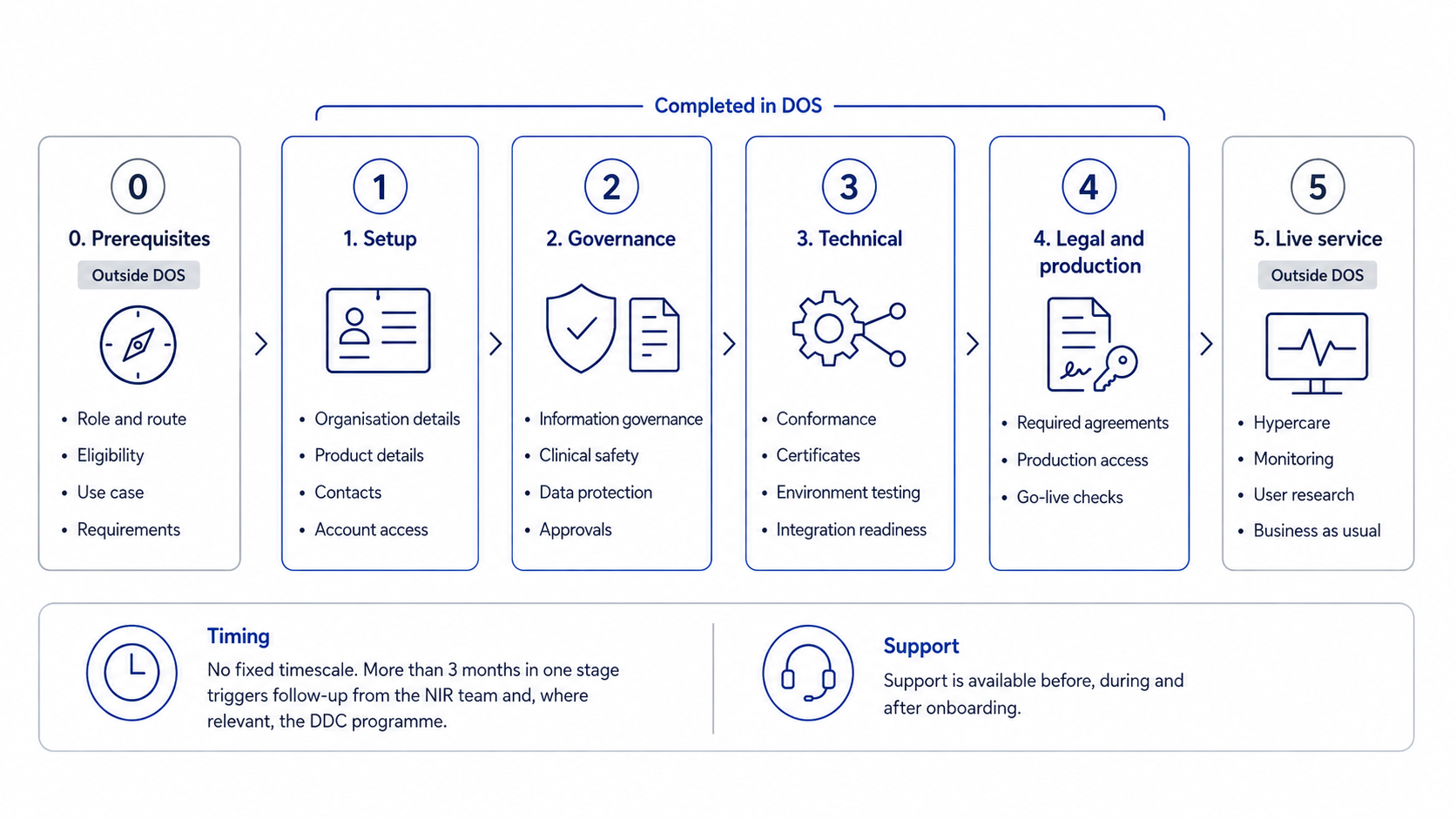
What happens at each stage
The NIR onboarding journey includes activities both within the Digital Onboarding Service (DOS) and outside it. There is no fixed timescale for completing onboarding. However, if your organisation remains in the same onboarding stage for more than three months, the NIR team will contact you to understand any barriers and provide support.
0. Prerequisites — outside DOS
Confirm that your organisation is ready to begin onboarding. This includes identifying your onboarding route, confirming eligibility and your use case, and understanding the governance, technical and assurance requirements that apply. You can discuss these with the NIR team before starting, or begin your DOS onboarding and the team will contact you once your assurance application is underway.
1. Setup
Once your eligibility has been confirmed, you will provide the core information needed to set up your onboarding. This includes details about your organisation, the product being connected, key contacts and confirmation that the appropriate team members have access to the required services.
2. Governance
Complete the information governance and clinical safety assurance requirements relevant to your role. The NIR governance page provides the supporting guidance and templates you will need for both suppliers and healthcare organisations.
3. Technical
Complete the technical activities required to connect safely to NIR. Depending on your role and connection, this may include supplier conformance, certificate exchange, environment testing, integration testing and readiness checks.
4. Legal and production
Complete the final legal, assurance and production-access requirements. This includes signing the relevant agreements and completing the required go-live checks before entering live service.
5. Live service — outside DOS
Once live, you will move into a period of hypercare and ongoing service support. This includes usage monitoring, user research and transition into business-as-usual arrangements.
Support is available before, during and after onboarding to help you progress through the process and get the most from your connection to NIR.
Onboarding at a glance
1. Confirm your route
Choose the route that applies to you:
-
Data Controller – healthcare organisation, care provider or Network on behalf of Trusts
- Data Processor – supplier, vendor or manufacturer
2. Confirm your use case
Decide whether you need to:
-
query and retrieve imaging data
- publish imaging data
- do both
NIR currently supports direct care use only during beta.
Supported use cases
- UC-1: Query and retrieve diagnostics – access imaging metadata, reports and images to support direct care.
- UC-2: Publish diagnostic data – make locally held imaging data discoverable to authorised organisations.
- UC-3: NHS-funded care across settings – enable independent providers and partners to access or contribute data for NHS-funded direct care.
If your use case does not fit exactly, still submit it. The NIR team will review it with you.
3. Submit your use case form
-
Healthcare organisations: complete the Healthcare Organisation use case form
-
Suppliers and vendors: complete the Supplier/Vendor use case form
Need help completing the form? Raise a request through the National Service Desk using the NIR request form.
4. Complete Digital Onboarding Service (DOS)
Log in or register through the Developer and Integration Hub and complete the assurance requirements for your route.
5. Prepare for go-live
Once the required assurance and technical steps are complete:
-
Suppliers sign the NHS England Connection Agreement and can progress into INT when invited by a healthcare organisation.
- Healthcare organisations complete rollout planning and Go/No-Go sign-off to confirm their planned go-live date.
Preview assurance questions
DDC Programme
NIR implementation is supported by the Digital Diagnostics Capability Programme, a funded programme enabling rapid adoption and rollout of NIR across the NHS.
For more information:
- email: [email protected]
- visit the National Imaging registry pages on Future NHS
Contact us
Need help with NIR onboarding or have a question about the process? Contact the NIR Delivery Team or raise a request through the Service Desk.
Raise a Service Desk request
Use the Service Desk to raise onboarding questions, request support with your use case, or ask for guidance on the next step.
Visit the Developer Community
You can also visit the National Imaging Repository topic on the NHS Developer Community to find updates, discussions and support materials.
Email: NIR Delivery Team at [email protected].
Further information
Governance for the National Imaging Registry is in place to make sure the service is safe, secure, lawful and clinically appropriate to use.
Use the ODS code finder to search for your organisation’s (supplier or healthcare) Organisation Data Service code. Your ODS code is required during NIR onboarding to identify your organisation and support assurance checks.
Use the Data Security and Protection Toolkit (DSPT) finder to search for your organisation’s (supplier or healthcare) published DSPT status.
The Digital Onboarding Service helps organisations and suppliers integrate with NHS APIs through a structured assurance process. It ensures compliance with NHS standards and enables secure access to NHS data.
Last edited: 25 September 2026 1:42 pm