Multiple instances of the same smartcard printer, or printer missing from list
Workarounds for a temporary issue involving multiple instances of the same printer being displayed in Care Identity Management, or the active printer displaying as 'copy'.
The issue
You are trying to print a smartcard in Care Identity Management and either:
- you're seeing more than one instance of the same DoH(V2) printer
- the active DoH(V2) printer is shown as a 'copy'
The cause
This was a bug DoH(V2) printers that was fixed in Care Identity Management release 5.61 on 15 August 2024.
If you experience this error
If you see this error after 15 August 2024:
- try clearing your browser's cache - press Ctrl + Shift + Delete
- try the workaround options below
- raise a case to the National Service Desk on the NHS Digital Customer Portal or email [email protected]
Workaround option 1
- Open Control Panel.
- Navigate to Hardware and Sound -> Devices and Printers -> Printers & scanners.
- Select each instance of the printer and 'Remove'. Make sure you remove all instances - do not leave just one as this will cause the workaround to fail.
- Turn the printer off and on again. Windows should then re-find the printer.
- Refresh your Care Identity Management session and try printing again.
Workaround option 2
Open Control Panel and navigate to Hardware and Sound -> Devices and Printers -> Printers & scanners.
If your printer DoH(V2) is showing as offline and you can see one or more copies of the same printer (e.g. DoH(V2) (copy 1), DoH(V2) (copy 2) etc), follow these steps:
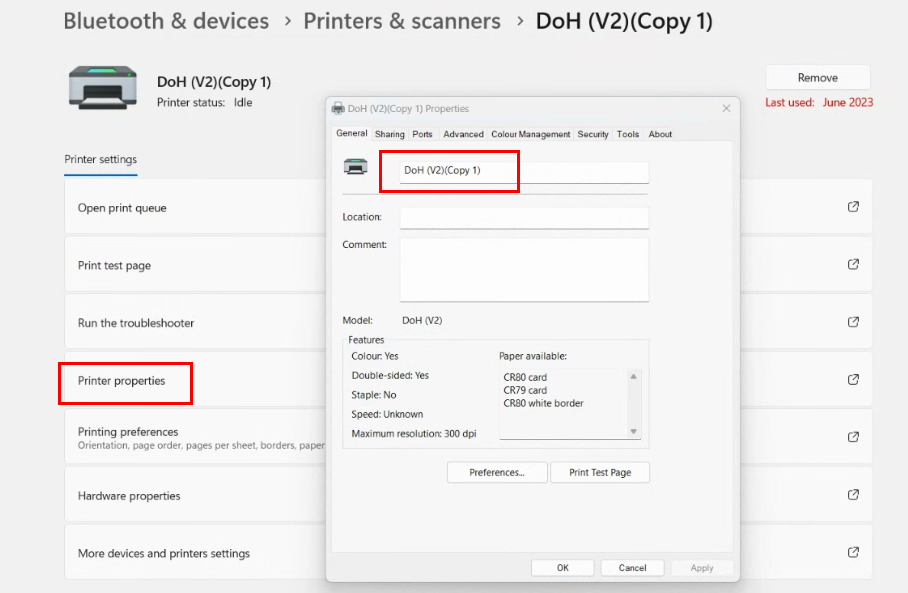
- Open Printer Properties for DoH(V2).
- Rename the printer as DoH(V2) - 1 and save the change. You can see the correct box within Printer Properties to rename the printer in the image below.
- For whichever copy of the printer is showing as Active, open Printer Properties, rename it as DoH(V2), and save the change.
Last edited: 15 August 2024 1:00 pm