PDS MESH user interface knowledge article: tracing deceased patients
This knowledge article provides an overview of how to use PDS MESH to get details of deceased patients as an alternative solution of the Spine User Death Report, which will be switched off.
Overview
This knowledge article provides an overview of how to use PDS MESH to get details of deceased patients as an alternative solution of the Spine User Death Report, which will be switched off.
PDS MESH lets you get patient details directly through the MESH User Interface (UI), ensuring efficient and accurate data management.
The PDS MESH service is designed to help organisations that prefer a ready-to-use solution without the need for developing bespoke software. This service is ideal for NHS trusts and local authorities, providing a reliable and secure method to access essential patient information.
For further details on this service, please visit our Personal Demographics webpage.
Pre-requisites
To use PDS MESH, your organisation needs to have:
-
successfully onboarded to PDS MESH
-
details of patients under your organisation’s care
To match patients using PDS MESH, use the template file (an Excel document) provided by the PDS MESH onboarding team (onboarding document attached in Section 3.0).
Guidelines for finding deceased patients
The template file includes 23 headers, but to find deceased patients you only need to use:
- NHS Number (NHS_NO)
-
Date of Birth (DATE_OF_BIRTH)
If you do not know the NHS Number you can use:
-
Family Name (FAMILY_NAME)
-
Date of Birth (DATE_OF_BIRTH)
-
Gender (GENDER)
-
Given name (GIVEN_NAME) if you know it
-
Postcode (POST_CODE) if you know it
If you do not know a patient’s full date of birth, you can provide the year and month (YYYYMM) or just the year (YYYY) to refine the search.
If you do not know the complete postcode, use the first half of the postcode followed by an asterisk (for example LS6*).
You should also include a unique identifier on each line of the file so that the results can be correlated.
Example
(Note: all data displayed in this document are fictional)
A user adds information to the file using the template provided. The user has five different patient examples in one file. They are:
-
only a partial FAMILY_NAME, but a full NHS_NO, GIVEN_NAME, GENDER, DATE_OF_BIRTH and POSTCODE
-
an NHS_NO, but with no FAMILY_NAME, GIVEN_NAME, DATE_OF_BIRTH or GENDER
-
no NHS number, but does have a FAMILY_NAME, GENDER, DATE_OF_BIRTH and POSTCODE
-
an NHS number, FAMILY_NAME, GIVEN_NAME, GENDER, DATE_OF_BIRTH and POSTCODE
No OTHER_GIVEN NAMES were provided by the user in the file.

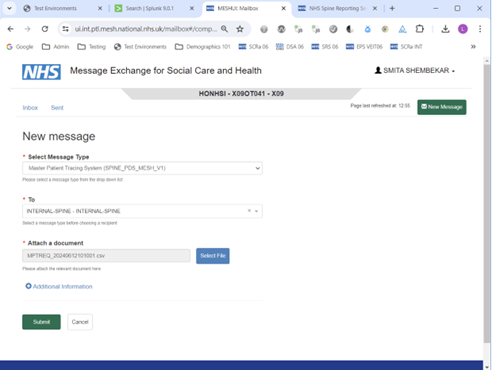
On the PDS MESH UI, select New Message, select Master Patient Tracing System (SPINE_PDS_MESH_V1) and then select Message Type.
Select INTERNAL-SPINE - INTERNAL-SPINE for the ‘To’ dropdown.
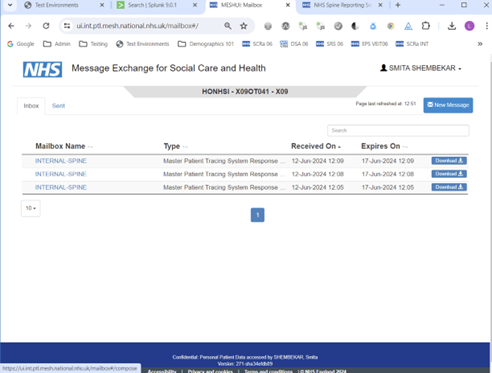
Select File, navigate to the location where the file is saved and attach the file.
Select submit.
Receiving the response file
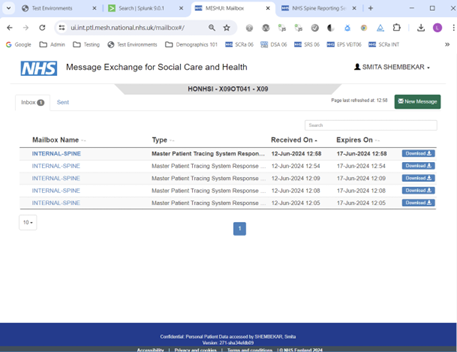
Under the Inbox tab, you will find all messages in your inbox. If you see any message titles in bold, this means that the messages are pending download.
Messages that are not downloaded after 5 days will be classified as undeliverable and removed from your inbox.
Interpreting the PDS Mesh response file
Deceased patients will return a value in the ‘date of death’ column.


Patients with an NHS number stored on PDS will see the value returned in the MATCHED_NHS_NUMBER column.
For more information, check the PDS Mesh Data dictionary.
For any issues with the PDS MESH responses, contact: [email protected]
How to get started on PDS Mesh
To begin integration and start using PDS MESH, complete the Personal Demographics Service Access Request form. Once access has been approved then the Digital Onboarding Service will help you to connect to PDS MESH.
Last edited: 24 October 2024 2:59 pm