Adding clinic closures
A clinic closure is a planned date when clinics will not run. You can add a closure when you create repeating weekly sessions.
Creating a weekly session
Select 'Clinics' on the main navigation menu. Then select 'Create and manage clinics' on the sub-navigation menu.
Select the green 'Create clinics' button at the top of the page and choose weekly sessions as the clinic type.
Enter your session details including dates, running days, times, capacity and services offered.
Adding a closure to your weekly session
Select 'Yes' on the clinic closures screen when asked if there are dates your clinic will not run.
Enter an optional name for the closure on the 'Add clinic' closure screen.
Enter the start date and end date for the closure.
Review your list of closures. Select 'Add another closure' if you need to add more dates.
Select 'Continue' when you finish adding closures.
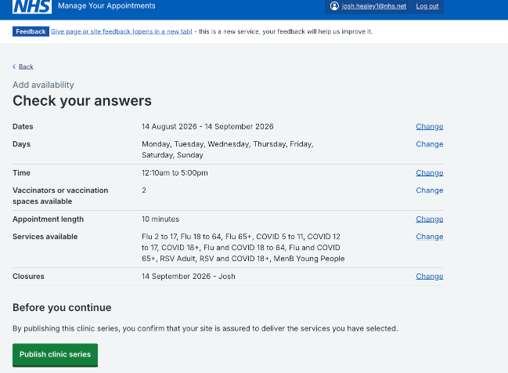
Review your session details on the 'Check your answers' page.
Select 'Publish clinic series' to save your weekly sessions and the closures you added.
Last edited: 3 September 2026 10:30 am