CRUDS operations explained
This page explains the CRUDS operations used by vaccinations services and how they apply when systems create, read, update, delete or search vaccination data. It is intended to help developers understand what operations are supported and when to use them.
Overview
This page explains how Create, Read, Update, Delete and Search (CRUDS) operations work in the Immunisation FHIR API.
It describes the end‑to‑end flow for managing immunisation events using both API calls and batch processing.
For full technical details, including schema definitions, request and response examples, and parameters, see the OpenAPI Specification (OAS) for the Immunisation FHIR API.
1. Create
An immunisation event must be created before it can be read, updated, searched, or deleted.
Using the API
- When an event is created successfully, the API generates an Immunisation ID (ImmsID).
- The ImmsID is a unique identifier for the event.
- You can find the ImmsID in the Location field in the response headers.
Using batch processing
- Events are identified using a composite identifier.
- This is made up of:
- UNIQUE_ID_URI
- UNIQUE_ID
- These values are combined using a pipe (|) character.
Example
UNIQUE_ID: dc5c80fd-2291-44b9-b56d-2b0d4052ea3d
UNIQUE_ID_URI: https://www.ravs.england.nhs.uk/
Resulting identifier: https://www.ravs.england.nhs.uk/|dc5c80fd-2291-44b9-b56d-2b0d4052ea3d
2. Search
Once an event has been created, you can retrieve it using the Search API.
Suppliers can search for events by providing:
- the NHS number in patient.identifier
- the disease type in immunization.target
The Search API returns matching immunisation events and includes:
- the ImmsID
- the event’s identifier system and value

The Search API returns matching immunisation events. From the response, suppliers can retrieve the immunisation id and the associated identifier values, which can then be used in subsequent Read, Update or Delete requests.
3. Read
The event created above can also be retrieved using Read API. To get the details of a specific immunisation event, the Read API requires the ImmsID as a parameter. It will then return the full details of that particular immunisation event.
Using the API
- The request requires the ImmsID as a parameter.
- The API returns the full details of the immunisation event.
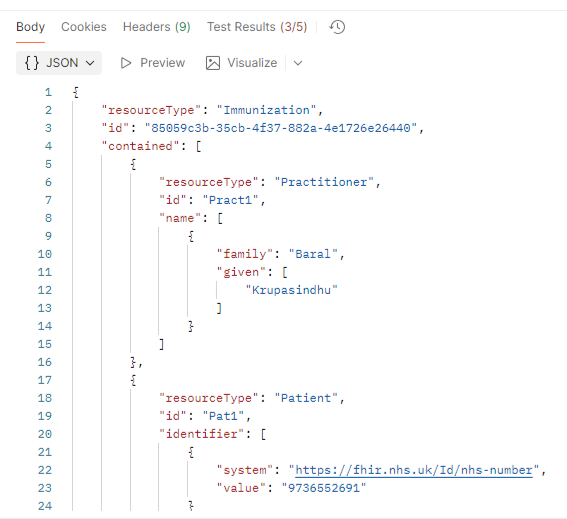
The Read API returns the full details of a specific immunisation event when you provide its id. This allows suppliers to view all information recorded for that event.
4. Update
Using the API
- To update an event, you must first retrieve it using the Read API.
- The response body from the Read API is used as the body of the Update request.
- The ImmsID is required as a parameter.
Each event has a version number, stored as an eTag:
- When an event is first created, the eTag is set to 1.
- To update the event for the first time, the eTag must be 1.
- After a successful update, the eTag is incremented to 2.
- Each subsequent update must use the current eTag value.
Using batch processing
- To update an event, set the Action Flag to UPDATE.
- The UNIQUE_ID and UNIQUE_ID_URI must match the existing event.
After an update, you can:
- use the Read API to retrieve the updated event
- use the Search API to find the event
5. Delete
Using the API
- The Delete API requires the ImmsID.
- Once an event is deleted, it cannot be retrieved using the Search or Read APIs.
Using batch processing
- To delete an event, set the Action Flag to DELETE.
- The UNIQUE_ID and UNIQUE_ID_URI must match the existing event.
6. Postman collection
A Postman collection is available containing examples for:
- Create
- Search
- Read
- Update
- Delete
File:
Immunization-fhir-api_Supplier.postman_collection.json
Last edited: 13 April 2026 11:51 am